How to Collect Logs from CB2000
Content
Environment
- Compute Blade 2000 (CB2000).
Procedure
Note: You may need more than one log set type for a case. For example, if the customer had a spontaneous reboot of a Windows host, we would need a getconfig and SVP logs. If the customer had an HVM Virtual Server crash, then we would need a getconfig of that host type when it comes back up, and the HVM dump (which would come with an SVP dump). Please use your best judgment for which log gathering procedures apply for the case.
All procedures can be run with the customer's credentials.
Please disable any web browser popup blockers during the log collection procedure and file upload.
Operating System:
- For Microsoft Windows OS, refer to the following solution: Windows Server Configuration (wingetconfig)
- For UNIX OS, refer to the following solution: UNIX Getconfig
- VMware ESXi = VMWare
getconfig - For Hitachi Virtage Manager (HVM) refer to the section below.
IP Switches:
- Telnet to the switch
- Enable log capture for Putty, TeraTerm or any other telnet application you might be using.
- Run "show tech-support"
- Save the output of the text to a log file
FC Switches:
Refer to the solution: Brocade Data Collection.
The easiest way to gather logs from the SVP is through its web interface.
- Like the AMS, use a web browser and the IP Address to get to the SVP Web interface.

- Navigate to SVP Web interface → Maintenance Tab → Log → Dump Log
- On the dropdown menu select "All management modules and partitions".
- Click "Download".

- A pop-up window may appear, asking to save the file, the resulting file will have the extion ".dmp".
This alternate method of getting the logs from the SVP is via the CLI. This may be faster for the customer depending on the situation, or necessary if they are unable to access the web interface.
- Telnet/SSH to the SVP IP address.
- Type
Sto enter the SVP - Type
DLfor Download Logs - Type
Dfor dump logs to file.
Use EX Command to return to Main Menu.

Use HE Command to get a list of available commands

4601RZ0 00003(1)SVP>DL

(S,E,D,P,M,A,F,I,C,[Q]) : D

Select module (P=Partition,M=Management module,A=All,[Q=Quit]) : A

WARNING : If confirm, it will take a few minutes to dump the log to the file.

Confirm? (Y,[N]) : - Once completed, the logs can be found on the SVP. You will need to connect to the SVP via FTP to obtain the logs, using an FTP application such as FileZilla.
- Upload the file to TUF.
HVM Log Collection:
Collect the LPAR manager dump into and from SVP on the LP screen:
- Connect to the SVP and enter the type
P. - Enter the partition number that is running HVM.
- If the blade is running HVM then you will be shown the main window.


- Select "LP Options" on the LP screen.

- Pressing the [Enter] key for "Execute" of "Take LP Dump" displays the subscreen. Select "Yes."

- Make sure that "Completed. Please check LP System Logs screen" has appeared.

- In the above operation, it takes two or three minutes until the LPAR manager dump is stored in SVP.
- Press the [Esc] key to return to the LP screen.
- Select "LP System Logs."
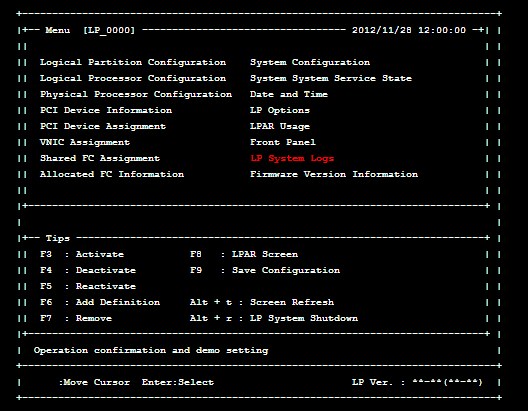
- Press the [Enter] key for the level selection portion in the upper right of the screen.

- The subscreen appears. Select "Error/Warn./Info."

- Make sure that the level selection indicates "All Level."

- Make sure that two "LP dump transfer succeeded." events are obtained around the time when the LP dump was obtained. If no events are displayed, contact the support section.

- According to the Dump Collection (Case 1) procedure, obtain the LP dump stored in SVP.
Note: To obtain two or more dumps, repeat steps (1) to (10). - When the HVM dump is complete, then you must go back and follow STEP 1 of the "Chassis Data Collection".
CXOne Metadata
Tags: CB2000,Chassis dump logs,CB2000 dump,CB2000 Dump logs
PageID: 11823
Solution Properties
- Keywords
- https://knowledge.hitachivantara.com/Support_Information/Data_Collection/Servers/How_to_Collect_Logs_from_CB2000
- Solution ID
- 242403050011823
- Last Modified Date
- 10/30/2024 02:29:15 PM
- Attributes
-
Page Privacy and Permission Assignment
- Page Privacy: Private
- Page Level Permissions: Anonymous; Employee; Service Partner; Customer; Knowledge Author; Knowledge Editor; IT; eServices; Knowledge Draft
- Article: reference
- Pagetype: knowledgearticle
- Taxonomy
- Collections
-
- Guest (Public)
- Views
- 0