Support Plan for VSP One SDS BLOCK
Content
**This Support Plan is only visible to Employees**
Feedback Form
- To access the feedback form, click here.
Documents Version History
| Publication Date | Document Revision | Description |
|---|---|---|
| March 20, 2024 | v1.13.00 Initial Version | New Marketing Name: VSP One SDS Block |
| April 15, 2024 | v1.13.00 GA Version | GA for v1.13 |
| June 17, 2024 | v1.14.01 GA Version | GA for v1.14 |
| September 26, 2024 | v1.15.01 GA Version | GA for v1.15 |
| October 24, 2024 | v1.16.00 GA Version | GA for v1.16 |
| January 31, 2025 | v1.17.00 GA Version | GA for v1.17 |
| July 31, 2025 | v1.18.00 GA Version | GA for v1.18 |
Scope
This Product Support Plan (PSP) is designed to provide general support information, technical reference information, and support philosophy for the following products:
| Family Name | Line | Model Name (full) | Model Name (abbr) |
|---|---|---|---|
| VSP One SDS Block | VSP One SDS Block | Virtual Storage Platform One SDS Block VMware | VSP One SDS Block VM |
| VSP One SDS Block | VSP One SDS Block | Virtual Storage Platform One SDS Block BareMetal | VSP One SDS Block BM |
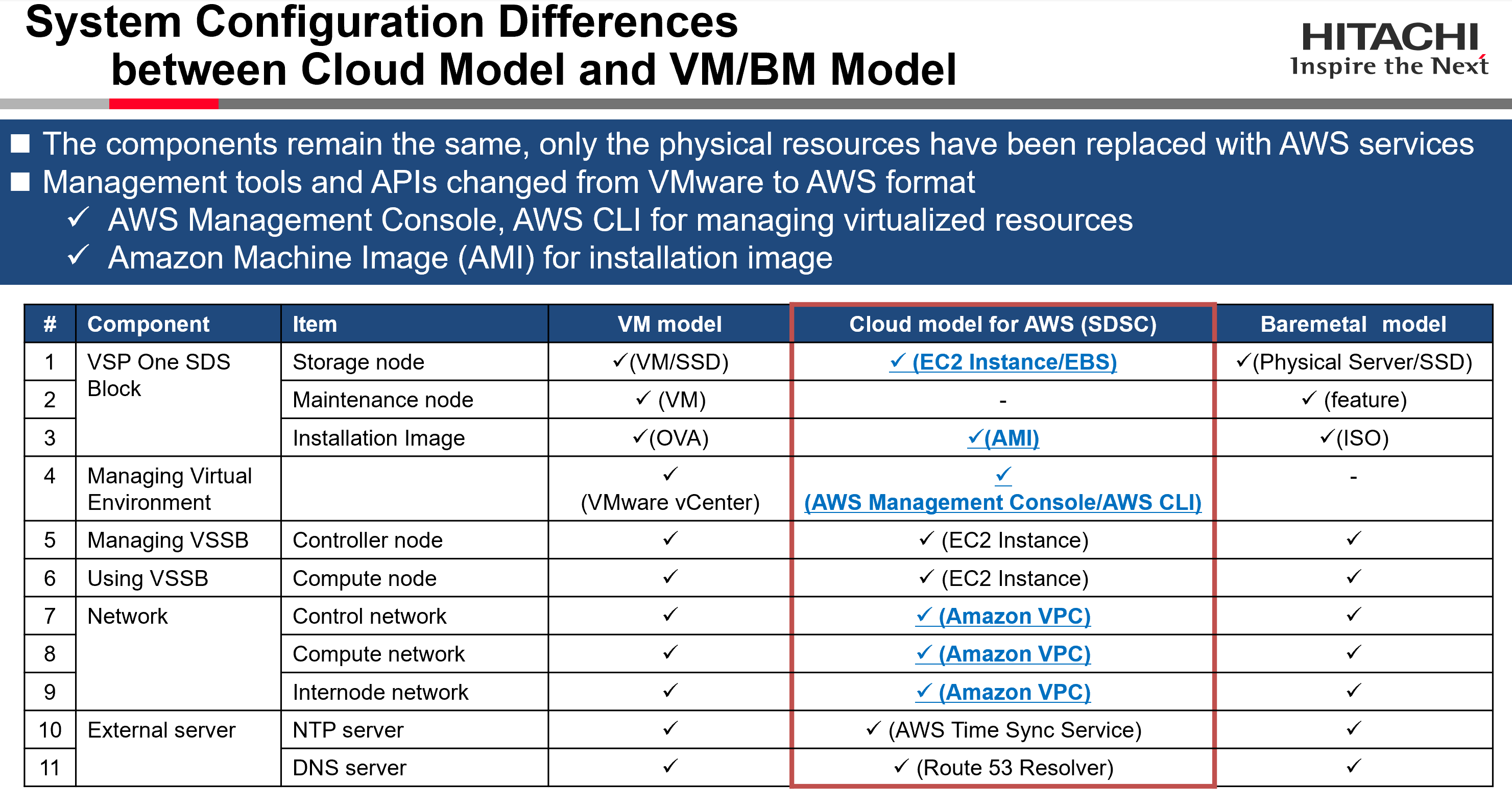
| VSP One SDS Block | VSP One SDS Block Cloud | Virtual Storage Platform One SDS Block Cloud AWS | VSP One SDS Cloud AWS |
| VSP One SDS Block | VSP One SDS Block Cloud | Virtual Storage Platform One SDS Block Cloud Azure | VSP One SDS Cloud Azure |
| VSP One SDS Block | VSP One SDS Block Cloud | Virtual Storage Platform One SDS Block Cloud GCP | VSP One SDS Cloud GCP |
Product Description
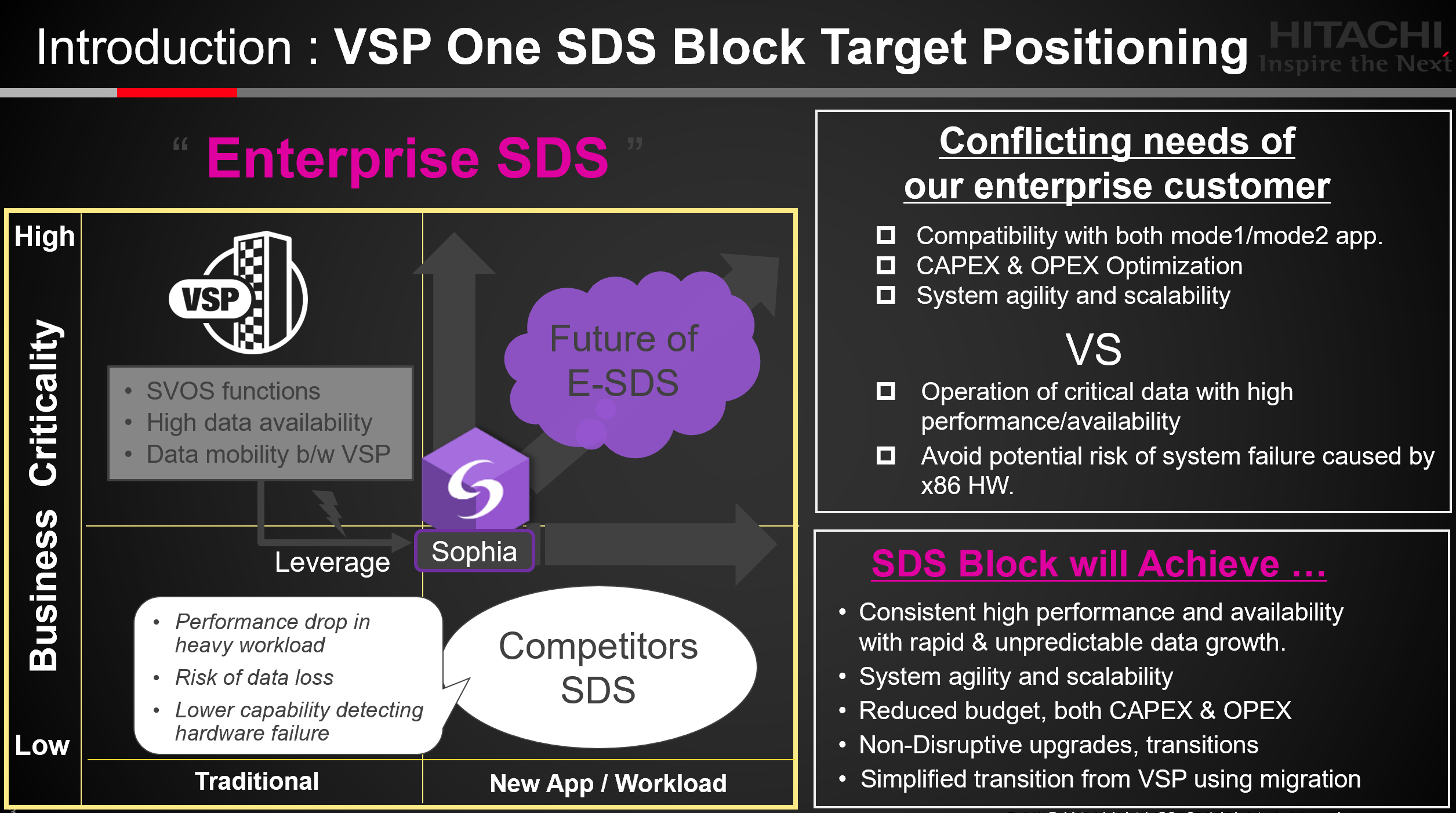
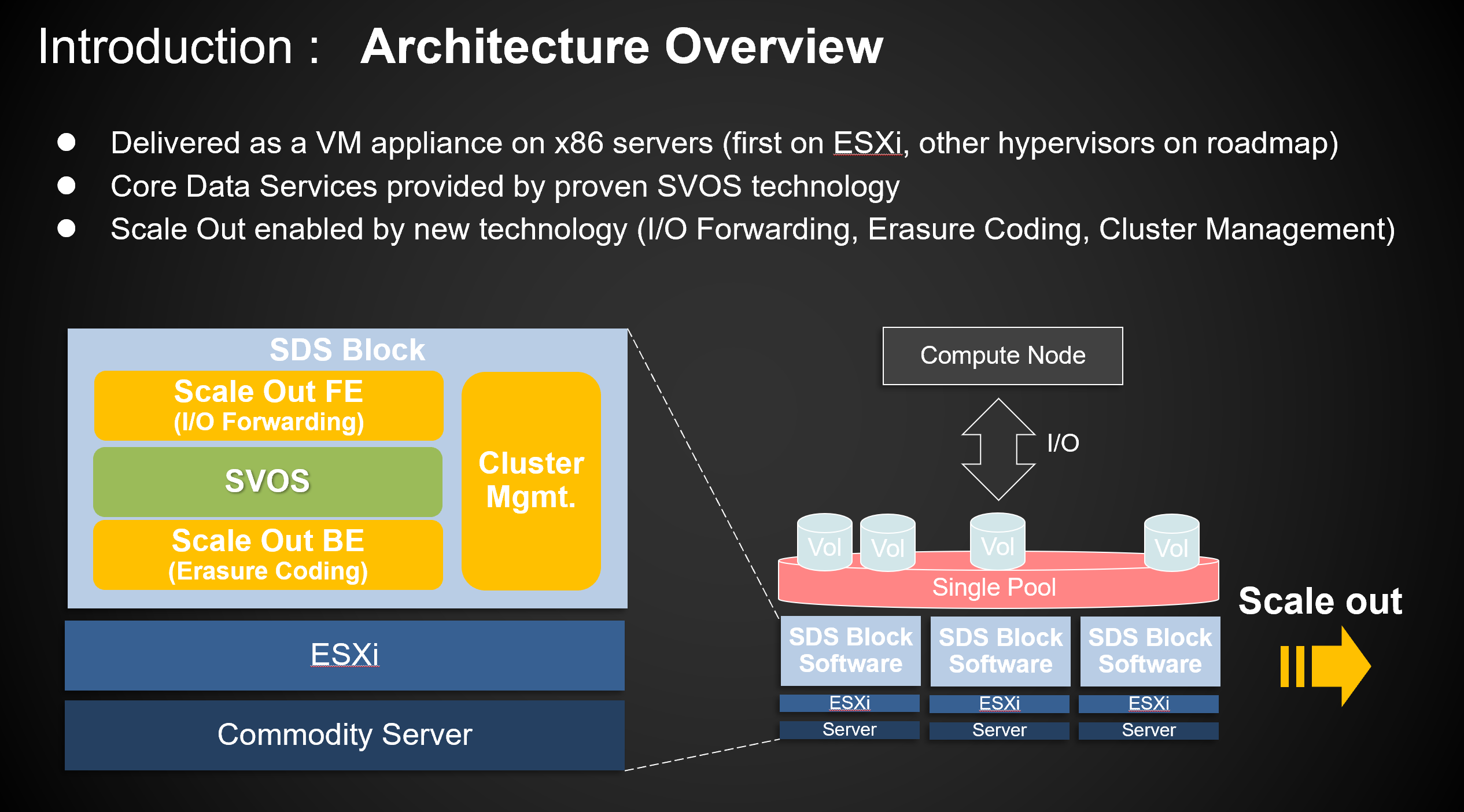
Hitachi Virtual Storage Platform One Software Defined Storage Block (VSP One SDS Block) is a distributed software-defined storage, high-performance and high-reliability scale-out block (SDS Blcok) storage platform that Hitachi Vantara offers.
It's a storage software solution that extends Hitachi's rich enterprise block data services into on-prem (VMware and Bare Metal) and the Cloud (AWS) services.
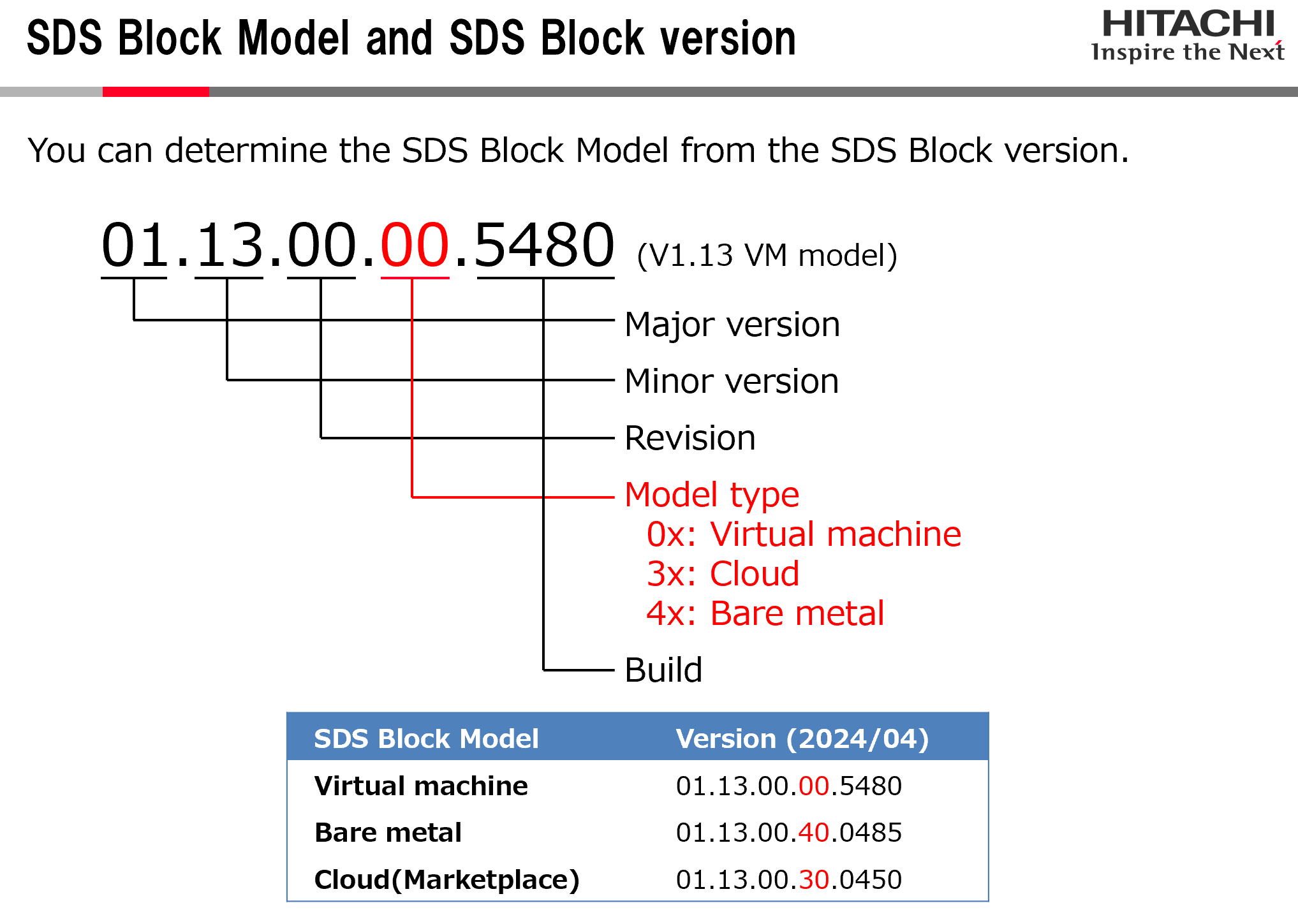
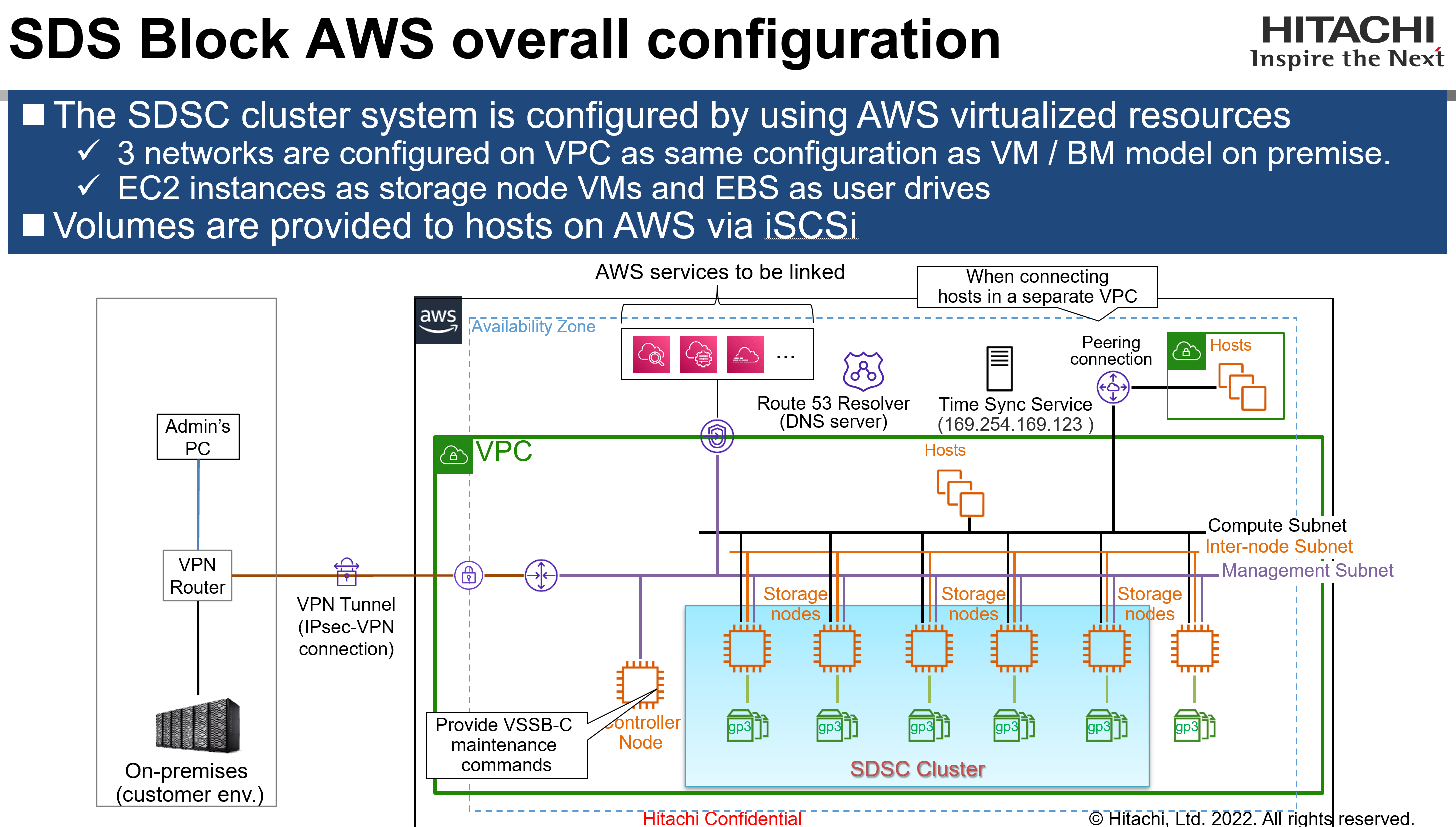
VSP One SDS Block is built by Hitachi engineers on select components of the SVOS storage operating systems, extending storage data services beyond SVOS proprietary hardware and into x86 commodity servers. The VSP One SDS Block software is packaged in full with the SUSE Linux operating system. It is packaged and delivered as an open virtualization appliance (OVA) installed on VMware ESXi virtual machine (VM) or Bare Metal system. Starting from v1.13.00, Hitachi will also support the deployment of VSP One SDS Block Cloud withing the AWS Marketplace using EC2 and EBS volumes.
Starting from v1.14.01, VMware ESXi (VM) version is not longer available. Bare Metal and Cloud version are the available options.
Starting from v1.15.01 Cloud version will have AWS Offering available in public at the following link: AWS Marketplace: Virtual Storage Platform One Software Defined Storage Block (amazon.com)
Starting from v1.18.00 Cloud version will have Azure Contract Offering available in public at the following link: Virtual Storage Platform One SDS Block on Azure Marketplace
Starting from v1.18.00 Cloud version will have GCP Contract Offering available in public at the following link: Virtual Storage Platform One Software Defined Storage Block-BYOL on Google Cloud Marketplace
VSP One SDS Block Cloud delivers an agile, scalable, performant and cost-effective solution to access, store, and manage data across a hybrid cloud environment.
Architect on EC2 instances, our patented Polyphase Erasure Coding removes barriers to scalability and maximizes performance and delivers on our legendary RAS capabilities, with no single point of failure.
Powered by the Software Virtualization Operating System and managed by Ops Center Administrator, customer experience the same common storage interface for proactive and predictive decision making.
Customers will supply the required VMware software and related licenses, or purchase as part of the solution. VSP One SDS Block VM and BM software will be bundled with software support-only sales in 1, 3, or 5-year subscriptions and bundled with the HA810/HA820 series server configuration. VSP One SDS Block AWS/Azure/GCP BYOL software will be bundled with software support-only sales in 1, 2, 3, or 5-year subscriptions. For VSP One SDS Block AWS PayGo software (utility model) license will be managed by AWS. All valid licenses of VSP One SDS Block denote support from Hitachi Vantara Global Support Center (GSC).



User data protection methods
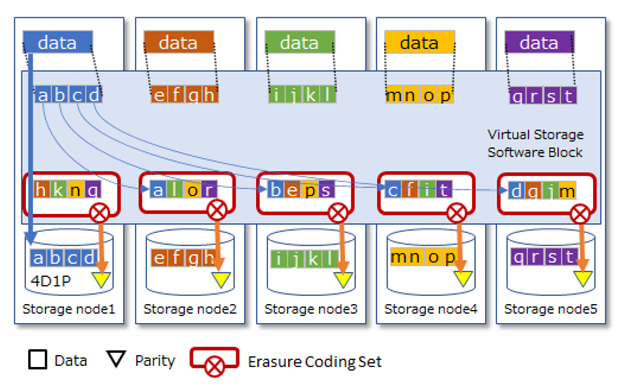
The Virtual Storage Software Block storage system supports Hitachi Polyphase Erasure Coding (HPEC) as the user data protection method. HPEC is a proprietary data protection method developed by Hitachi for SDS systems and uses narrow internode network bandwidth for outstanding capacity efficiency.
HPEC can be selected from two methods and is set during setup.
HPEC 4D+1P
This method is suitable when capacity efficiency and performance are important.
- User data and its parities are stored on five or more different storage nodes for redundancy.
- At least five storage nodes are required.
- Users can use 60 to 75% of the physical capacity.
- The read performance is the same as HPEC 4D+2P, but the write performance is better than HPEC 4D+2P.
- The number of storage nodes or drive failures allowed is one.
HPEC 4D+2P
This method is suitable when the number of failures that can be tolerated is important.
- Store and redundant parity of user data and user data on six or more different storage nodes.
- The original user data is stored on a local drive.
- At least six storage nodes are required.
- Users can use 50 to 65% of the physical capacity.
- The read performance is the same as HPEC 4D+1P, but the write performance is about 60% of HPEC 4D+1P.
- The number of storage nodes or drive failures allowed is two.

VSP One SDS Block list of terms
| No.
| Category
| Term
| Meaning
|
| 1 | SDS Block
| Physical node
| A physical server on which SDS Block is installed
|
| 2
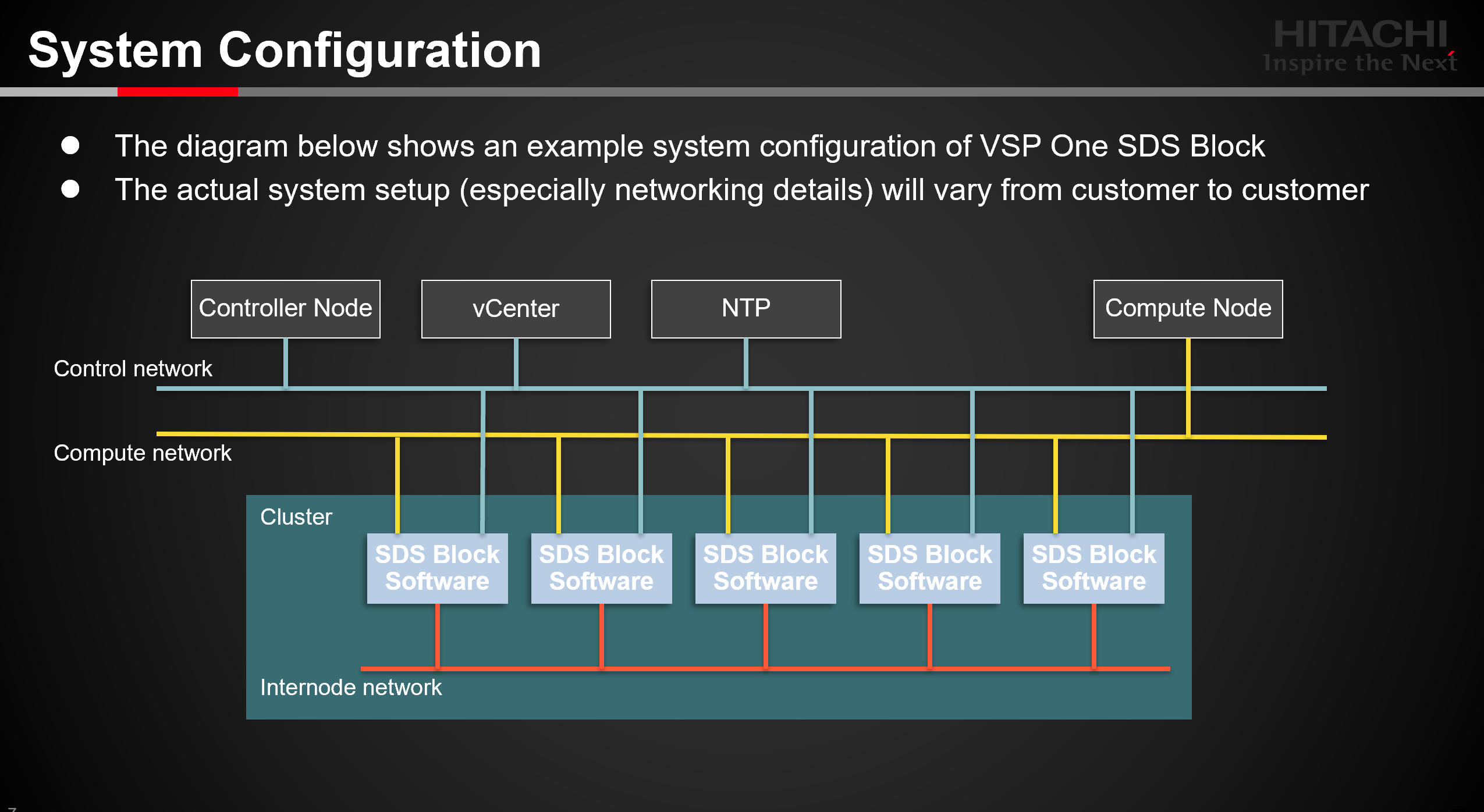
| Storage node
| A group of SDS Block software processes that are running on a physical server with resources (CPU, memory, and storage devices) allocated either installed at customer data center or hosted by Cloud provider.
| |
| 3
| Compute node
| A node on which user applications run, that instructs the storage node to input or output user data
| |
| 4
| Controller node
| A management node that is used for SDS Block setup or to instruct execution of SDS Block management functions (such as creating a volume)
| |
| 5
| Network between storage nodes
| A network that connects storage nodes with each other. The storage nodes use this network to exchange user data and management information.
| |
| 6
| Compute network
| A network between a compute node and storage node. These nodes use this network to input or output user data.
| |
| 7
| Management network
| A network between a controller node and storage node. These nodes use this network to perform SDS Block management operations and communicate with SNMP, NTP, and other external services.
| |
| 8
| Storage pool
| A logical user data storage area consisting of multiple storage devices
| |
| 9
| Volume
| A logical device that is mounted on a compute node to read or write user data
| |
| 10
| Storage device
| A generic name for an SSD, HDD, or another physical device that is used to store user data and the OS
|
Summary of Supported Feature (v1.13.00)
| # | Category | Summary of Supported Feature | ||||
| ESXi | Cloud (AWS) | Bare Metal | ||||
| 1 | Platform | Commodity HW ( HA800 Server) | ✔ | - | ✔ | |
| Cloud (AWS EC2) | - | ✔ | - | |||
| 2 | Multi Node | # of Storage Node | ✔ (32) | ✔ (18) | ✔ (32) | |
| # of Compute Node | ✔ (32) | ✔ (32) | ✔ (32) | |||
| 3 | Scale Out | Pool Expansion | ✔ | ✔ | ✔ | |
| Capacity Rebalance | ✔ | ✔ | ✔ | |||
| Online node additions and removal | ✔ | - | ✔ | |||
| 4 | Connectivity | FC Target | ✔ | - | - | |
| iSCSI Target | IPV4 | ✔ | ✔ | ✔ | ||
| IPV6 | ✔ | - | ✔ | |||
| 5 | Data Control | Data Migration (FC) | ✔ | - | - | |
| Data Compression | ✔ | ✔ | ✔ | |||
| 6 | Management | Install | ✔ | ✔ | ✔ | |
| Install guard | ✔ | ✔ | ✔ | |||
| Provisioning | ✔ | ✔ | ✔ | |||
| Monitoring | ✔ | ✔ | ✔ | |||
| vCenter Collaboration | ✔ | - | - | |||
| Snapshots | ✔ | ✔ | ✔ | |||
| Online upgrades | ✔ | ✔ | ✔ | |||
| Network separation | ✔ | ✔ | ✔ | |||
| License control | ✔ | ✔ | ✔ | |||
| Backward compatibility support for CM-REST API | ✔ | ✔ | ✔ | |||
| e-mail support | ✔ | ✔ | ✔ | |||
| DNS support | ✔ | ✔ (Amazon Route 53 Resolver only) | ✔ | |||
| SNMP support | ✔ | ✔ | ✔ | |||
| Batch setting of Path/Volume-Server connection | ✔ | ✔ | ✔ | |||
| API/CLI/GUI | ✔ | ✔ | ✔ | |||
| Configuration Utility | ✔ | - | - | |||
| 7 | Reliability | Data Protection (Mirror) | ✔ | ✔ | ✔ | |
| Data Protection (HPEC) | ✔ | - | ✔ | |||
| Data Protection (HPEC 2P) | ✔ | ✔ | ✔ | |||
| Fault Domain | ✔ | - | ✔ | |||
| Fault Tolerance | ✔ | ✔ | ✔ | |||
| Node auto recovery | ✔ | ✔ | ✔ | |||
| Rebuild | ✔ | ✔ | ✔ | |||
| Cache backup on SSD | ✔ | ✔ | ✔ | |||
| 8 | Security | User Identification & Authentication (Local) | ✔ | ✔ | ✔ | |
| User Identification & Authentication (External) | ✔ | ✔ | ✔ | |||
| Audit Logging for Privileged Users | ✔ | ✔ | ✔ | |||
| Privileged Administrator Roles, RBAC | ✔ | ✔ | ✔ | |||
| SNMP Firewall | ✔ | ✔ | ✔ | |||
| SSH port Disable | ✔ | ✔ | ✔ | |||
SDS Cloud AWS, Azure, GCP model v1.18.0 specifications
| # | Terminology | AWS model | Azure model | GCP model |
| 1 | Virtual Machine | EC2 Instance | Virtual Machines | Compute Engine |
| 2 | Disk | EBS | Managed Disk | Hyperdisk |
| 3 | Network | VPC | VNet | VPC |
| 4 | Feature of group VMs for availability | Placement Group | Scale Set | Spread Placement Policy |
| 5 | Availability Zone | Availability Zone | Availability Zone | Zone |
| 6 | NACL Security Group | NACL Security Group | Network Security Group (NSG) | Next Generation Firewall (NGFW) |
Note: For v1.17, v1.18 and future releases, please check https://compatibility.hitachivantara.com for the latest Hardware Software Compatibility List in SOFTWARE DEFINED STORAGE session and and SDS Block Hardware Compatibility Reference in documentation portal. « SDS Block » Welcome to the Hitachi Vantara Documentation Portal
Service and Support Strategy
There are couple Support Services Options offered with VSP One SDS Block:
Software only
Software License:
• VSP One SDS Block VM / BM : Standard- 12/36/60-months subscription base (on prem version)
• VSP One SDS Block AWS BYOL: Standard- 12/24/36/60-months subscription base (AWS version)
• VSP One SDS Block AWS PayGo and Contract offerings: Subscription will based on the actual AWS Market Listing terms in AWS Marketplace
If this is a Solution (H/W + S/W) offered by Hitachi Vantara, the minimum Software and Hardware maintenance term shall be 36 months
Hardware:
• Standard- 36/48/60 month: Will be offered- Same as HA800 series servers
• Premium- 36/48/60 month: Will be offered- Same as HA800 series servers
Disk Retention Option (DRO) will be offered- Same as HA800 series servers
Comprehensive Disk Retention Option (CDRO) will be offered- Same as HA800 series servers
For details of Hitachi Vantara support services strategy, descriptions, and deliverables, please refer to Hitachi Support Service Descriptions and Deliverables.
Initial warranty period is 36 months for Hardware and 12 months for Software as noted in the above link. The initial service quote will contain renewal rates for maintenance beyond the initial warranty period. After the period covered by the initial quote, maintenance is renewable annually at then-prevailing rates.
VSP One SDS Block VMware /Bare Metal Operation Tasks
(Roles and Responsibilities)
| Stage | Operation | Who does | Note |
| Initial Hardware Setup (Distribution Center) | Download of all 3 Media Kits relevant to BG | Distribution Center | HA800 Server Media kit, SDS Block Media Kit, SDS Block Build Guide media kits (firmware for switches) |
| Confirm HA810 and HA820 G1/G2 Internal components | Distribution Center | Includes all management and storage nodes, having the DC confirm that HDD, Memory, CPU, SAS controllers, SAS Expanders, Risers, Network components are placed and seated correctly | |
| Prepare Racks for hardware installation | Distribution Center | Removal of Doors | |
| Install SDS Block Serial Number, Cable Management Brackets | Distribution Center | Placement mimics UCP | |
| Rack all Components within the Rack | Distribution Center | Includes Storage Nodes, management nodes, Internode Switches, Compute Network Switches, Control Network Switches, PDUs | |
| Cable all Power and Network Components | Distribution Center | Connect all C13/C14 Power cables, Cat6 connections and SFPs Connections for Internode Compute and Control Networks | |
| Configure Control Network | Distribution Center | Initial Setup of the switch with default users, load firmware, Load Switch configuration for internal facing ports (No configuration for Customer Uplinks) | |
| Configure iSCSI Compute Network | Distribution Center | Initial Setup of the switch with default users, load firmware, Load Switch configuration for internal facing ports and ISL (BASED ON ITPRO recommendations - (Active/Backup) No configuration for Customer Uplinks) | |
| Configure FC Compute network | Distribution Center | Initial Setup of both Cisco MDS or Brocade G620 switches. With Firmware load, Brocade License load (NO Switch Configuration is Provided by DC) | |
| Configure Internal Network | Distribution Center | Initial Setup of the switch with default users, load firmware, Load Switch configuration for internal-facing ports and ISL (BASED ON ITPRO recommendations - (Active/Backup)) | |
| Configure Management and Storage nodes | Distribution Center | Setup ILO Users based on Compute Tag, Configure Raid for Boot drive, Bios Setup, ILO IP (Default Address), Upgrade of SPV firmware | |
| Prepare System for Shipment | Distribution Center | Disconnect cables between racks, shutdown, package and ship | |
| Initial Software Setup (on-site) | VMware (ESXi) Installation | Global Delivery (GD) | |
| vCenter Installation | Global Delivery | ||
| Maintenance Node Setting | Global Delivery | ||
| VSP One SDS Block on prem SW Installation (+Cluster NW Setting, etc.) | Global Delivery | Network configuration and settings within VMware need to be included here. We also need to add topics around the physical network connectivity | |
| Storage Pool Setting | Global Delivery | ||
| Compute node connection | CS&S | ||
| Path Setting (Including host-side storage target adding & host reboot) | CS&S | ||
| Storage Manager Account Setting | CS&S | ||
| Initial Data Migration (UVM) | Global Delivery | ||
| Volume Provisioning | Compute node connection | GD and Customer | GD will do initial setup and knowledge transfer to customer, then customer owns daily operation |
| Path Setting (Compute Node Creation, Volume Creation, Attach/Detach) | GD and Customer | GD will do initial setup and knowledge transfer to customer, then customer owns daily operation | |
| Vol management | GD and Customer | GD will do initial setup and knowledge transfer to customer, then customer owns daily operation | |
| Remote Replication | Test/Dev, Data Re-purposing | GD and Customer | GD will do initial setup and knowledge transfer to customer, then customer owns daily operation |
 Remote Backup Remote Backup | GD and Customer | GD will do initial setup and knowledge transfer to customer, then customer owns daily operation | |
| DR/HA | GD and Customer | GD will do initial setup and knowledge transfer to customer, then customer owns daily operation | |
| Local Backup | Snapshot operation | GD and Customer | GD will do initial setup and knowledge transfer to customer, then customer owns daily operation |
| Monitoring | Monitoring | GD and Customer | GD will do initial setup and knowledge transfer to customer, then customer owns daily operation |
| Configuration Change | Data Reduction (Volume Compression) On/Off | GD and Customer | GD will do initial setup and knowledge transfer to customer, then customer owns daily operation |
| Software Update | Online Software Update | Global Delivery | |
| Offline Software Update | Global Delivery | ||
| vSphere Update (ESXi) | Global Delivery | If Customer purchased E2E solution, GD will do it; if customer has VMware license, then customer owns it | |
| vCenter Update | Global Delivery | If Customer purchased E2E solution, GD will do it; if customer has VMware license, then customer owns it | |
| vRops Update | Global Delivery | If Customer purchased E2E solution, GD will do it; if customer has VMware license, then customer owns it | |
| configuration utility (Smart Configurator) | Global Delivery | If Customer purchased E2E solution, GD will do it; if customer has VMware license, then customer owns it | |
| vCenter Plugin Update | Global Delivery | If Customer purchased E2E solution, GD will do it; if customer has VMware license, then customer owns it | |
| Server Firmware Update | CS&S | ||
| Drive Exchange | Drive exchange (remove+add) | CS&S and GD | CS&S will perform physical operation on-site and GD will perform logical VSSB operation remotely |
| Drive Add | CS&S and GD | CS&S will perform physical operation on-site and GD will perform logical VSSB operation remotely | |
| Drive Remove | CS&S and GD | CS&S will perform physical operation on-site and GD will perform logical VSSB operation remotely | |
| Node Add | CS&S and GD | CS&S will perform physical operation on-site and GD will perform logical VSSB operation remotely | |
| Node Remove | CS&S and GD | CS&S will perform physical operation on-site and GD will perform logical VSSB operation remotely | |
| HW Configuration Change | FE ex) FC ->iSCSI | CSS | |
| BE | CSS | ||
| SCM | CSS | ||
| Diagnosis | CSS | ||
| Failure Recovering | Take system dump | CS&S and GSC | CS&S will perform on-site activities and GSC will provide remote support |
| Drive | CS&S and GSC | CS&S will perform on-site activities and GSC will provide remote support | |
| Node | CS&S and GSC | CS&S will perform on-site activities and GSC will provide remote support | |
| FE SFP | CS&S and GSC | CS&S will perform on-site activities and GSC will provide remote support | |
| FE Port | CS&S and GSC | CS&S will perform on-site activities and GSC will provide remote support | |
| FE SCM | CS&S and GSC | CS&S will perform on-site activities and GSC will provide remote support | |
| Pool | CS&S and GSC | CS&S will perform on-site activities and GSC will provide remote support | |
| Vol | CS&S and GSC | CS&S will perform on-site activities and GSC will provide remote support | |
| VMware error | CS&S and GSC | CS&S will perform on-site activities and GSC will provide remote support | |
| GUI | CS&S and GSC | CS&S will perform on-site activities and GSC will provide remote support | |
| Recovery | CS&S and GSC | CS&S will perform on-site activities and GSC will provide remote support |
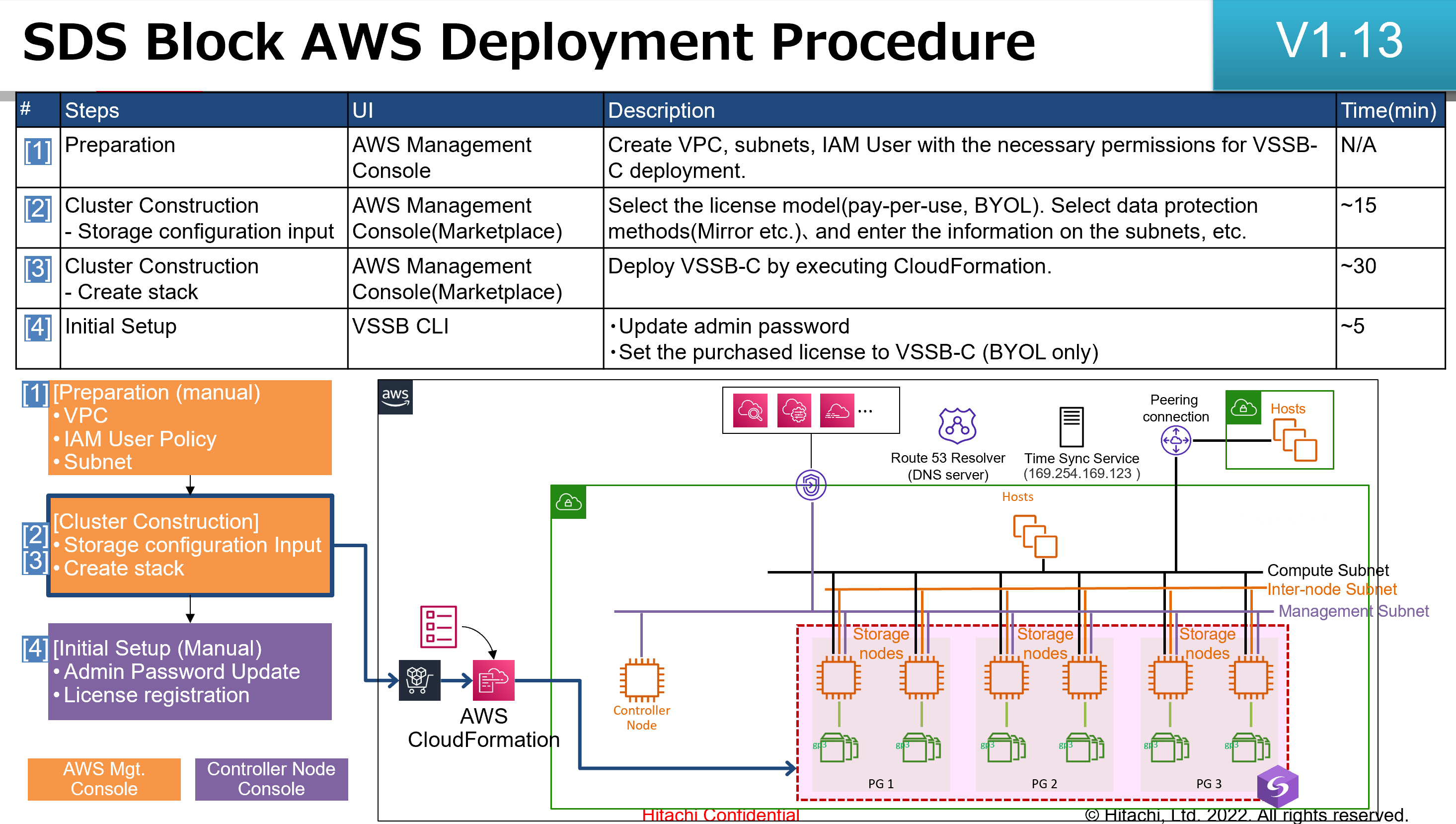
Note: VSP One SDS Block AWS Software (BYOL/PayGo/Contract) Operation Tasks will be performed by customer itself like support connect registration, self installation and self upgrade, etc.
For VSP One SDS Block AWS Hardware Issue, customer need to contact AWS for support.
Software Support Services Terms
- See Hitachi Support Service Descriptions and Deliverables
- See Hitachi Vantara Warranty Maintenance and Support Terms
- See Hitachi Vantara Software License Terms
- See Hitachi Direct Purchasing Agreement
- See Product Compatibility Guide: Interoperability-Support- Matrix
Severity
- Severity Levels
Escalating to Vendor
Contact according to the time zones and information provided at below link.
VMware:
Other Vendor:
Escalation Procedures for Hitachi Vantara Multi-Vendor Solutions
Escalating to Hitachi
- For additional information on management and technical escalation see Escalating to Hitachi.
HA800 Server:
Entitlement to Support
Entitlement is based on standard business rules of the entitlement process in Salesforce. Sometimes Hitachi Vantara or the vendor need to ensure entitlement to support via special methods (e.g. web, use of s/n).
Note: VSP One SDS Block AWS Contract Private Offer have 12/24/36/60 months contract terms.
Installation & Upgrade Service Offerings
Installation Service
| Type | Name | Description | SKU |
| HW Installation Services | Hitachi Advanced Server HA8X0 Business Hours Installation Service | Installation Services | 045-000169-01.P |
| Hitachi Advanced Server HA8X0 24X7 Installation Service | Installation Services | 045-000170-01.P | |
| Hitachi Advanced Server HA8X0 G2 Business Hours Installation Service | Installation Services | 045-000432-01.P | |
| Hitachi Advanced Server HA8X0 G2 24X7 Installation Service | Installation Services | 045-000433-01.P | |
| Hitachi Advanced Server HA8X0 G3 Business Hours Installation Service | Installation Services | 045-001037-01.P | |
| Hitachi Advanced Server HA8X0 G3 24X7 Installation Service | Installation Services | 045-001038-01.P |
Global Delivery/GSS Service Offerings
Global Delivery/GSS offers services to implement and accelerate the time value of key features.
| Type | Name | Description | SKU |
| Professional Services | Hitachi Virtual Storage Software Implementation Service | Mandatory implementation service (RPQ) | 051-100819-01.P |
<< Add Link for Sophia Professional Services - Salesforce Resource Center once available >>
Field Upgrades
VSP One SDS Block VM and VSP One SDS Block BM Software product upgrades must be performed by Hitachi Professional Services
HA800 Server Hardware product upgrades must be performed by Hitachi CS&S or qualified ASP/ISP (I&C partners are not authorized to perform upgrades).
Warranty
General Statement
- Warranty
Maintenance Service Offerings
Centralized Support Structure
- For the centralized support structure click here.
-
**This article is only visible to Employees**
Centralized support has a multi-tier support structure utilizing field support (CS&S and CSC) and remote support (Levels 0-4). All problems or Cases reported will be tracked by the Salesforce database system.
This centralized support system facilitates several ways to open and escalate Cases. Cases can be initiated on an automated basis by Remote Ops (Hi-Track) (automatic paging), by Field Support (CS&S personnel including CSC support, Partners/Authorized Service Providers), or by customers. Customer calls may come in through CS&S or directly to remote support Level 0.
Call Flow Diagram

Roles and Responsibilities
Customer Responsibilities
- Customer need to register and explore Support Connect capabilities for VSP One SDS Block Customers
Basic product information requirements are fulfilled via Support Connect. The functions cover most of the common
product inquiries for both the partner and the end customer. Support Connect functions are outlined in detail below:
• Registration
• Knowledge
• Technical Bulletins
• Cases
• License Management
• Product Downloads
• Product Documentation
• My Products and Sites
• Interoperability
Note: VSP One SDS Block AWS Software (BYOL/PayGo/Contract) Operation Tasks will be performed by customer itself like support connect registration, self installation and self upgrade, etc.
VSP One SDS Block AWS Software customer product registration
URL: https://support.hitachivantara.com/en/productregistrationcheck.html?
AWS Marketplace: Virtual Storage Platform One Software Defined Storage Block [CONTRACT]
AWS Marketplace: Virtual Storage Platform One Software Defined Storage Block (PayGo)
AWS Marketplace: Virtual Storage Platform One Software Defined Storage Block (BYOL)
Any question after product registration submission , please feel free to contact Hitachi Vantara at ProductRegistration@hitachivantara.com with your registration ID case number # to confirm the status of your submission and ensure the registration information was accurately received.
For VSP One SDS Block AWS Hardware Issue, customer need to contact AWS for support.
Hitachi Vantara Responsibilities
- Click here for General Roles & Responsibilities
Support Systems
- Click here for information regarding systems used by Hitachi Vantara including Insight and Hitachi Vantara Knowledge.
Documentation, Firmware, Releases, Patches, Bug Fixes, and Notifications
This section explains how these items get from the vendor to Hitachi Vantara and our customers. View the related link below.
· View the Website for Software Defined Storage – HitachiVantara.com
· View the Datasheet for VSP One SDS Block– HitachiVantara.com
· View the Documentation for VSP One SDS Block - Hitachi Vantara Product Documentation
· View the Blog for VSSB
· View the Infoflash for VSSB
· View the Compatibility Guide for VSP One SDS Block
Note: For the latest VSP One SDS Block Code and Documentation set, please go to TISC and Documentation Portal.
Hitachi Vantara Support Connect
On Support Connect customers can find a listing of their products and sites as well as open Service Requests, Product Downloads, Ops Center Clear Sight, Technical Bulletins and ECNs. Visit Support Connect.
Service Tools
Tools Required for Maintenance
- Click here to learn more about general maintenance tools and tools for region or division.
Hitachi Remote Ops (Hi-Track) Remote Service Tool
- For more information regarding Remote Ops (Hi-Track) click here.
Product Lifecycle
Lifecycle Dates
Hitachi Vantara's Product Life-Cycle Matrix for VSP One SDS Block information can be found at Time Based Support Lifecycle Matrix - Guest
End of Life (EOL) and End-of-Service-Life (EOSL) Policies
Hitachi Vantara's official Life-Cycle Matrix with EOSL information can be found at External Product Life-Cycle Matrix.
Logistics
Spare Parts
- For information regarding Spare Parts click here.
-
**This article is only visible to Employees**
Pre-GA Notes
The following items are addressed as pre-GA spares planning steps:
- Spares pricing defined by the Pricing team
- The Global Spares Planning team populated spares in depots based on install base locations
Spares Usage vs. Product Inventory DOAs
Spare parts are available to repair subsystems whose components and features have been successfully installed at the customer site. If a part used in a new subsystem installation or feature installation is DOA during its installation, then a replacement should come from Product Inventory and not Spares Inventory.
Spare Parts Order and Return Process
Spares Part Kits
Spare parts are stocked in various locations throughout the world and are controlled by Spares Planning. Spare parts are located to meet a NBD SLA from the site.
Spare parts potentially impacting performance such as Cache, Channel PCBs and those impacting maintenance such as the SVP will be located within six hours of the site. All other parts that are either internally spared in the subsystem, or those which do not potentially cause loss of performance will be located no further than eight hours from the site. In EMEA this will be next day delivery.
The following is being defined and represents a placeholder.
A Kit: This is a complete set of parts. Two sets of this kit will be located in USA for worldwide support (Dallas, Texas and Indianapolis, Indiana (Will Change to Oklahoma). There will also be additional sets located at the European Distribution Center (EDC), and some major countries in EMEA and AP.
B Kit: Depot kit - Each major Depot center in the US will keep one set of these parts. Strategic stock locations in EMEA, and AP will keep enough sets to support the base in that region. Response times vary in AP, and EMEA.
Spares Part Listing & Reference
Visit Logistics Spares SharePoint site for a comprehensive view of spare parts. Also try the Spares Alternate view (under "Switch view options" at the top right of screen). The Spares Alternate view includes the product pcode (Product Feature column) that the spare part replaces.
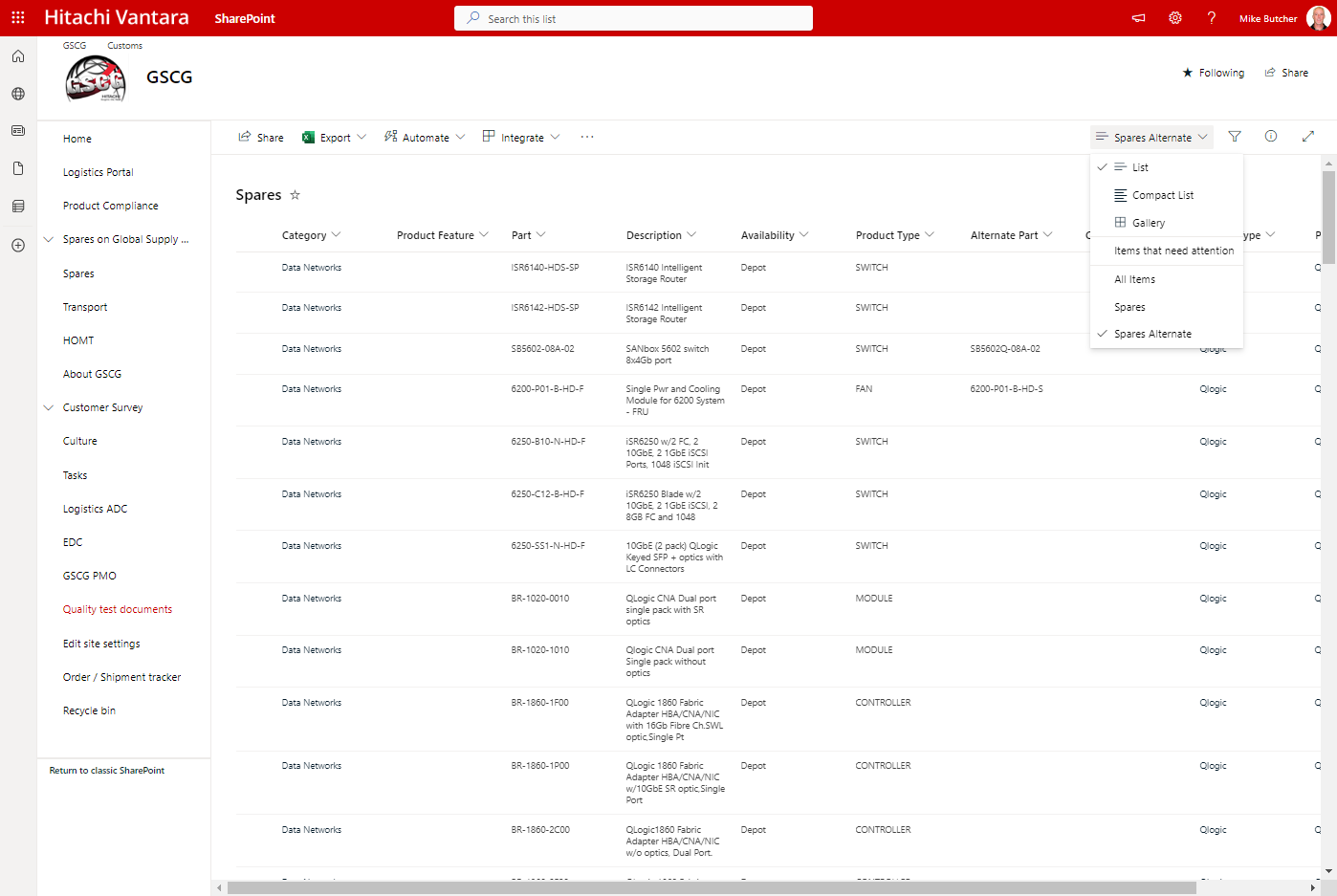
If you are having problems finding a spare part, do the following:
- Look in the maintenance manual
- Contact GSC for assistance
Mechanical Replacement Procedures & Special Investigation
Procedures are defined at the following locations:
RMAs
Educational Plan
Global Support Center Training
- Click here for information regarding Level 1 and 2 Global Support Center Training.
Field Engineer Training Requirements
Training objectives have been delivered to Global Learning to prepare training offerings for maintenance, installation and configuration classes. These requirements were developed to ensure field engineers from Hitachi Vantara and Hitachi Qualified Partners are well prepared to support the product(s).
Here is the Field training link: Global Learning Training for VSP One SDS Block: Hitachi Learning Center (1113CW)
Training for Hitachi Vantara solutions that may include the product(s) may include solution-specific references.
General Required Skill Sets
Go to Global Learning below related to VSP One SDS Block trainings.
Global Learning and Its Course Offerings
- Learn more about Global Learning and its course offerings.
Channel Partner Service Programs
- For links and information related to Channel Partner Service Programs click here.
-
**This article is only visible to Employees**
Channel Partner Program
Please refer to these links for further information.
- Channel Partner Program
- Partner Program Overview
- Find out more about our award winning partner program
- Presentations
- Program Guides
- Program Recruitment Kit
- Partner Resources

Channel Partner Service Programs
Please refer to these links that contain helpful information.
- Channel Partner Service Programs Documentation
- Support Resources

ASP
ASPs should have the same capability to service products as Hitachi does direct. ASPs are required to train to the same standards as Hitachi’ own engineers and Hitachi provides maintenance documentation, spares and 2nd/3rd level support as part of Hitachi backline fees.
If the products are provided to customers as part of a solution, refer to the ASP section of the applicable Solution Product Support Plan.
ISP
Independent Service Provider
N/A
- Channel Partner Program
Attachments
Attachment: 7374_20240807163451_240417300268734.pptx
Solution Properties
- Keywords
- https://knowledge.hitachivantara.com/Internal/Product_Support_Plans/Support_Plan_for_VSP_One_SDS_BLOCK
- Solution ID
- 243403060184778
- Last Modified Date
- 07/11/2025 07:39:12 PM
- Attributes
-
Page Privacy and Permission Assignment
- Page Privacy: Private
- Page Level Permissions: Employee; IT; eServices
- Pagetype: knowledgearticle
- Taxonomy
- Collections
-
- Employee
- Views
- 0