

Summary
Content
Documents Version History
| Publication Date | Author | Document Revision | Description |
|---|---|---|---|
| October 20, 2025 | Mike Butcher | 1.0 | GA version of PSP |
| February 3, 2026 | Mike Butcher | 1.01 | Updated HV Learning Center Courses for B85 |
Scope
This Support Plan is designed to provide general support information, technical reference information, and support philosophy for the following products:
| Family Name | Line | Model Name (full) |
|---|---|---|
| VSP One Block 85 | Block 85 | VSP One Block High End |
Product Lifecycle
This Support Plan is designed to provide general support information, technical reference information, and support philosophy for the following products:
| Model Name | Lifecycle Milestone dates | Description |
|---|---|---|
| VSP One Block 85 | January 30, 2026 | Initial GA of VSP One Block High End |
Product Overview
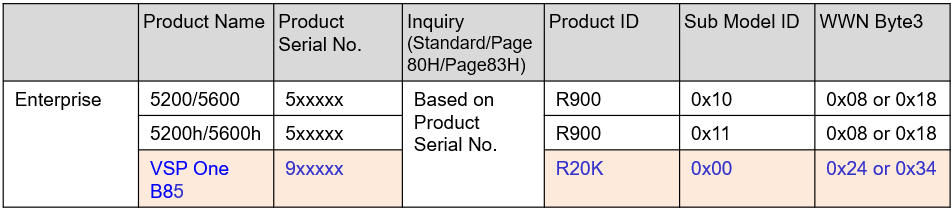
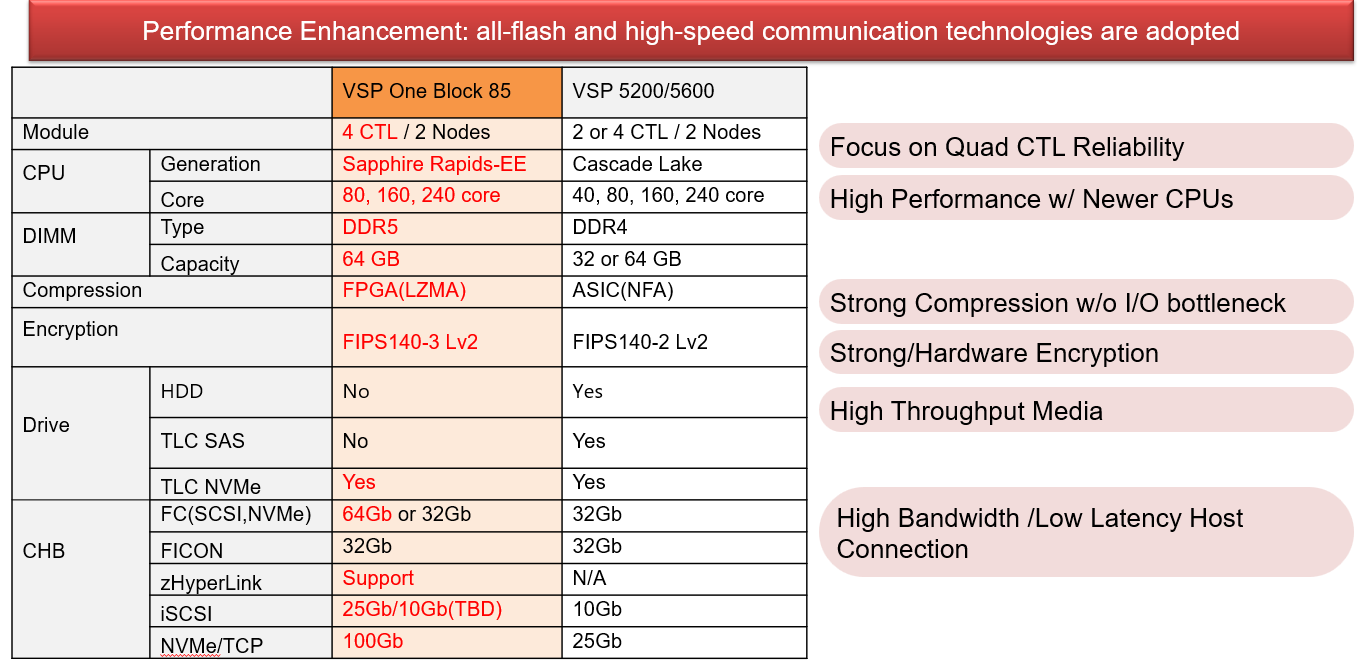
The VSP One Block High End is the successor of the VSP 5200/5600. There is only one High End model with the official marketing name of "VSP One Block High End" and will be sold as an appliance. HVKK internal name is "VSP One B85".
The Product ID, WWN and Serial Number are revised from the previous generation:
Display type and Model

Architecture

Hardware Updates
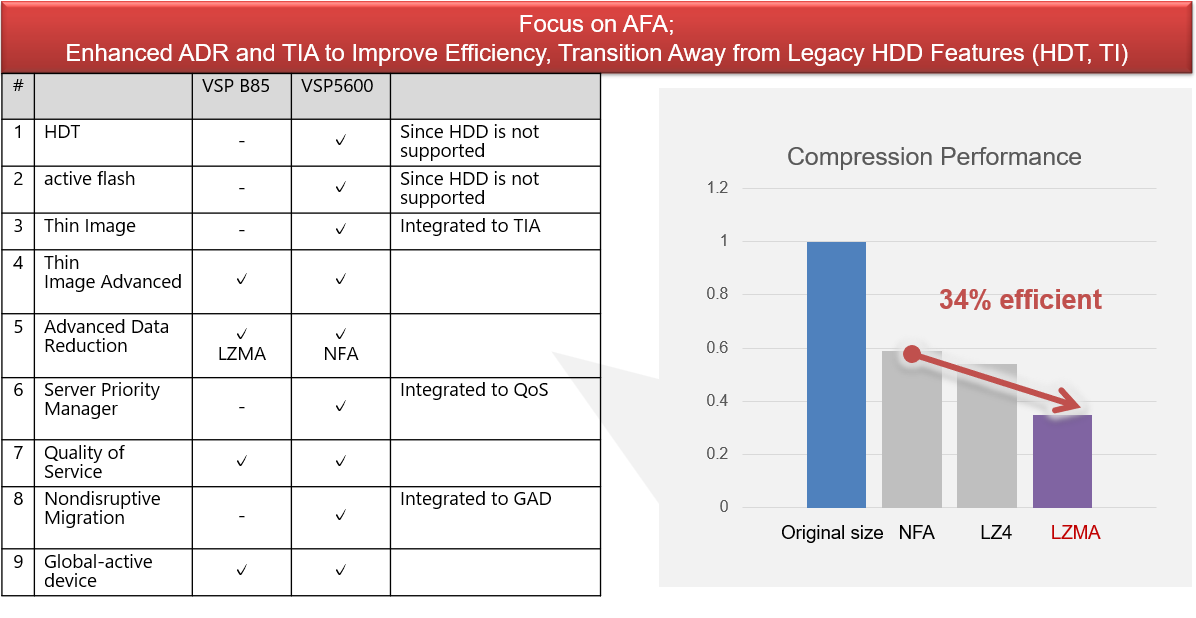
AFA Feature Details
Security Updates

Management Architecture Update

Configuration Options:
Configurations:
- Model: VSP One Block High End (Block 85)
- Environment Type:
- Open
- Mainframe only (not upgradable to Open)
- Node Quantity options:
- 2 nodes
- 4 nodes
- 6 nodes
- Software Bundle:
- All-inclusive software
- Capacity Configuration Model:
- Balanced
- Price
- Scalability
- Manual disk selection
- Diskless
- I/O Feature options:
- 32G FC (target) shortwave ports
- Node (default)
- 8 x 32 Gbps shortwave ports
- 16 x 32 Gbps shortwave ports
- 24 x 32 Gbps shortwave ports
- 32 x 32 Gbps shortwave ports
- 40 x 32 Gbps shortwave ports
- 48 x 32 Gbps shortwave ports
- 32G FC (initiator) shortwave ports
- Node (default)
- 8 x 32 Gbps shortwave ports
- 16 x 32 Gbps shortwave ports
- 24 x 32 Gbps shortwave ports
- 32 x 32 Gbps shortwave ports
- 40 x 32 Gbps shortwave ports
- 48 x 32 Gbps shortwave ports
32G FC (target) longwave ports
- Node (default)
- 8 x 32 Gbps shortwave ports
- 16 x 32 Gbps shortwave ports
- 24 x 32 Gbps shortwave ports
- 32 x 32 Gbps shortwave ports
- 40 x 32 Gbps shortwave ports
- 48 x 32 Gbps shortwave ports
- 32G FC (initiator) longwave ports
- 32G FICON Longwave ports (Mainframe)
- Node (default)
- 8 x 32 Gbps shortwave ports
- 16 x 32 Gbps shortwave ports
- 24 x 32 Gbps shortwave ports
- 32 x 32 Gbps shortwave ports
- 40 x 32 Gbps shortwave ports
- 48 x 32 Gbps shortwave ports
- 32G FICON with encryption longwave ports (Mainframe)
- zHyperlink ports (Mainframe)
- 2 x xHyperlink ports
- 4 x zHyperlink port
- 32G FC (target) shortwave ports
IO Features:
- 100G TCP (target) ports
- 4 x 100G TCP ports
- 8 x 100G TCP ports
- 12 x 100G TCP ports
- 16 x 100G TCP ports
- 20 x 100G TCP ports
- 24 x 100G TCP ports
- 25G iSCSI (target and initiator) ports
- 4 x 100G TCP ports
- 8 x 100G TCP ports
- 12 x 100G TCP ports
- 16 x 100G TCP ports
- 20 x 100G TCP ports
- 24 x 100G TCP ports
Installation:
- Hitachi Local Business Hours Installation
- Hitachi 24x7 Installation
Maintenance:
- GCS&S Maintenance options:
- Basic
- Standard
- Premium
- ASP Maintenance options:
- Backline Support Include Spares - same business day
- Backline Support Including Spares - Next business day
- Backline Support Excluding Spares
Service and Support Strategy
Support Levels:
Level 0 - Global Customer Care /
- performs initial customer engagement.
- Entitlement verification
- Escalate to GSC L1
GSC L1:
- Checks documentation and knowledge base for solution
- Escalates to L2 as needed
CS&S:
- CS&S escalates to GSC for support on field maintenance procedure issues that cannot be solved by CE
GSC L2: Assists GSC L1 for cases that cannot be resolved by GSC L1
- Escalates to HVKK 4SC team for Level 3 support
Service Tools
List of Tools Needed by Field Support Engineers.
Maintenance PC
The CE laptop can be used as a maintenance PC and run the MPC software. The MPC software is designed for initial setup for CTO and for the CE to perform limited maintenance functions such as turning system option modes on or off. SVP monitor runs on the MPC (not on the SVP).
Customer Scenarios and Maintenance Strategies
There are several scenarios identified below that might occur at customer sites that will affect how the maintenance console is supplied, configured and utilized.
Performing Maintenance and Security Restrictions
In some cases, due to security or data integrity reasons, customers will not permit maintenance personnel to connect their laptop to the Ethernet ports (public/private) on the SVP. In these restricted environments the customer must supply a laptop to be used as the maintenance console by the CE whenever he is to access the VSP One Block High-end (B85) for status or for maintenance. This laptop must have the minimum maintenance console requirements outlined previously.
Direct Access Maintenance Requirements
When performing maintenance or upgrades on internal components the maintenance personnel is advised to connect directly into the system that he will be performing the maintenance on. Some maintenance procedures require extensive interaction and coordination between the micro-program, the CE and the maintenance activity. This will require the appropriate work area and power requirements for extended maintenance activities and may include directly connecting a monitor/keyboard/mouse to the SVP.
Microcode
Microcode is the term used to identify the program files and firmware required to enable VSP One Block High-end (B85) microprocessors and software components to function. Microcode can be installed onto the VSP One Block High-end (B85) as a maintenance activity.
Microcode Exchange
Microcode can be installed online non-disruptively unless there are extenuating circumstances such as a problem detailed in a Technical Alert or because of a specific configuration or problem in a customer’s environment. Please read all alerts prior to performing an upgrade. Instructions, cautions and restrictions shown in a TechAlert or TechTip take precedent over the same information published in a manual or other document.
General Procedures/Theory
The general exchange procedures and theory can be found in the Maintenance Manual for each model. The maintenance manual is for use only by Hitachi Vantara Field or Authorized Service Personnel.
Microcode Engineering Change Notice (ECN)
The Microcode ECN document has been split into several documents:
ECN Base Document
The ECN base document details the microcode contents such as program files, tools released with the microcode set, etc. The last page contains a list of all associated appendices.
- Appendix A: Supported Features and Functions – Lists new Features/Functions/Enhancements.
- Appendix B: Related Documentation – Lists associated documentation numbers and revisions (maintenance manuals, users guides, etc.).
- Appendix E: Change of Contents (Bug Fixes, Severity and Probability of Occurrence)
- Appendix F: Program versions summary – Lists previous program set releases, their associated release number (V#) and ECN number.
- Appendix G: Listing of related program versions.
- Miscellaneous Appendices – Depending upon the need other appendices may be included in the ECN set.
Microcode Exchange Document
This document was previously Appendix C of the microcode ECN of previous models and contains additional exchange instructions. This document is updated with the latest exchange special procedures, restrictions, and considerations required for performing a microcode exchange. It has been split off into this separate document to simplify revision control ensuring that the most current set of instructions is always used. This document’s instructions can be used for all exchanges between all versions of generally released microcode. The first page of this document includes revision control. Therefore, before performing a microcode exchange, please always obtain the latest revision.
Microcode Exchange Wizard Tool (XLSX)
This tool is an excel spreadsheet with macro programs that can assist Authorized Service Personnel in determining the correct procedures to use when exchanging microcode. The user enters the current microcode version and the desired microcode version and the program produces a series of questions that need to be answered. Once all of the questions are answered, the program automatically generates the correct procedures to be followed, pre-exchange, exchange and post-exchange. There is no revision associated with any microcode set. This program will handle exchanges for all generally released microcode. Therefore it is essential to always obtain the latest revision before performing an exchange. The latest version of a Microcode Exchange Document should also be referenced when performing an exchange.
Microcode Inheritance Matrix
A microcode inheritance matrix is available that will allow a CE to create a list of the differences between the microcode version that a machine is running, and the microcode version that is targeted in the upgrade. This can be used to persuade a customer to upgrade.
Tools Required for Maintenance
Lifecycle Dates
| Product/Feature | GA | Withdrawal From Sale | End of Service Life |
|---|---|---|---|
| VSP One Block High End | February 2, 2026 | TBD | TBD |
End of Life (EOL) and End-of-Service-Life (EOSL) Policies
Hitachi Vantara's official EOSL Matrix can be found at Product Life-Cycle Matrix
Education Plan
Global Support Center Training
There were 2 SRT sessions for the initial GA. SRT is now managed by Product Management and attendees much be officially invited by PM.
SRT collateral for GSC is linked below.
Hitachi Vantara Learning Center courses
- Transitioning to Hitachi VSP One Block High End - 1523PI
- Installing Hitachi VSP One Block 85 High End - 1422PI
Feedback Form
- To access the feedback form, click here.
CXOne Metadata
Tags: PSP, SIP, Product Support Plan, Support Implementation Plan, VSP One Block, High End, B85