

Summary
Content
**This Support Plan is only visible to Employees**
Documents Version History
| Publication Date | Document Revision | Description |
|---|---|---|
| March 20, 2020 | v1.0 | Support Plan corresponding with 9.0 release and G11 launch on 4-21-2020 |
| August 5, 2022 | v1.1 | Removed GEN1/GEN2 references to G11 nodes |
| October 17, 2022 | v1.2 | Release of HCP 9.4 which includes features and bug fixes. Not considered a Service pack. See Rel notes and ECN. |
| May 14, 2026 | v1,3 | Contacts Updated |
Scope
This Product Support Plan (PSP) is designed to provide general support information, technical reference information, and support philosophy for the following products:
| Family Name | Line | Model Name (full) | Model Name (abbr) |
|---|---|---|---|
| HCAP-B | HCP G11 | Content Platform | HCP |
Product Description
Hitachi Content Portfolio (HCP) is a core product of Hitachi Vantara that is a secure, simple and smart web-scale object storage platform generally used for archive, backup, and compliance of unstructured data. It is a software-based platform that is deployed either on hypervisors as HCP VM or as an appliance with dedicated access servers called access nodes such as HCP G series nodes. These access nodes form a cluster (see Figure 1) that virtualizes, and federate back-end capacity supplied by HCP storage nodes (HCP S series nodes), block, file or public cloud object stores. A cluster is multiple servers working together to provide higher availability and/or performance. The currently shipping version of HCP contains G10 access nodes and is known as the HCP G10 Appliance.
The HCP G11 Appliance is replacing the currently shipping HCP G10 Appliance with new access node hardware (tentatively “G11”) to drive revenue growth by capitalizing on market demand for object storage, 3-year refreshes of the G10 as well protecting HCP and our customers from supply chain risks that have been identified with the G10. The HCP G11 will include an updated version of HCP software to the support the new G11 hardware.
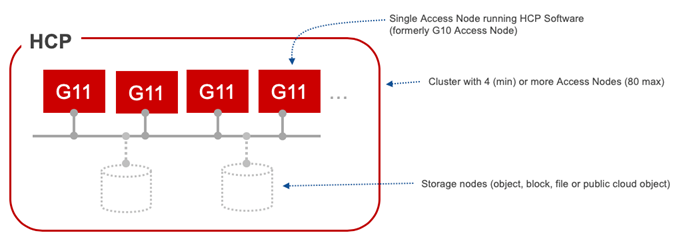
Figure 1: HCP Appliance with 4 Access Node Cluster.
|
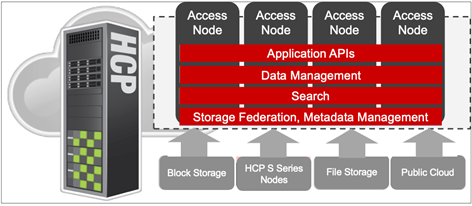
The new HCP G11 Appliance is a high-powered server that virtualizes and federates back-end capacity supplied by HCP storage nodes (HCP S series nodes), block, file or public cloud object stores. As an appliance, HCP runs on access servers called access nodes such as HCP G series nodes. These access nodes form a cluster with a minimum configuration of 4 G11’s. Each access node in the HCP system runs a complete software stack that serves as an access point for applications, performs service and management functions and can be enlisted to serve as an object repository using local storage (see Figure 2). Each HCP access node can take over the functions of other nodes in the event of a node failure.
Figure 2: HCP G11 Appliance with each access node running a copy of the HCP software
|
G11 offerings include
- Quanta DS220 node based appliances
- Software only VM and KVM
All software shipped with the G11 will be v9.0 and above.
Upgrading previous generation HCAP and HCP clusters with G11 nodes
The Sales Configurator supports upgrading older appliances with new G11 hardware using the standard add-node service procedures documented in the applicable version of the Maintaining HCP System Hardware guide.
G node Product codes
| G model | Chassis Product Code | Description | Notes |
| G10 | 1S2B0900068.P | D51B 2U 3.5in Bay Chassis | D51B-2U |
| G11 | 1S5BZZZ004R.P | DS220 LFF Chassis SAS/SATA SKU w/ 1200W PSU | D52BQ-2U |
| G11 | 1S5BQ200183.P | DS220 LFF 12x LFF SAS/SATA SKU. LBG-4 for HV w/ 1200W PSU T4 | D52BQ-2U
|
configuration options:
- Internal Storage (configured as RAID6) - G11 uses Hardware RAID as opposed to G10 uses software RAID!
- Backend switch options for G11:
- Bring-your-own-switch
- 1GbE options:
- 10GbE options:
- Cisco N3K: 48 port (N3K-C31108PC-V.P) or 96 port (N3K-C31128PQ-10GE.P)
- Extreme VDX 6740 48 port (going end of sale in Oct 2021. Will continue to ship while product inventory lasts)
- New backend switch option as of 9.3 GA on 08-10-2021
- Arista 24 port 10GbE SFP+ Ethernet Switch HITUCP7020SR-24C2-R.P
- See ECN HCP-0014 (or later version) for more complete list of supported network switches
- Arista 24 port 10GbE SFP+ Ethernet Switch HITUCP7020SR-24C2-R.P
G11 attached storage platform options:

G11 Economic Storage options:

See the latest ECN for complete support matrix
G10 / G11 Comparison:
|
| G10 | G11 |
| Node Type | Same: General Access Node | |
| Allowable Storage | Same: internal, HCP S-Series, SAN, Cloud, NFS | |
| Internal Disk (per node) |
| |
| Internal Disks | 6 or 12 x 4 TB HDD (SAS), or 12 x 1.9 TB SSD (SATA) | ...or 12 x 3.8 TB SSD (SATA) |
| RAID | Same: RAID 6 (4D+2P), All-flash: RAID 6 (10D+2P), Rear cage: RAID 1 | |
| Raw | 24 TB or 48 TB or 22.8 TB | ...or 45.6TB |
| Hardware |
| |
| Server | Quanta D51B-2U | Quanta D52BQ-2U |
| CPU | Haswell – Intel Xeon E5-2620 v3 | Cascade Lake – Intel Xeon Silver 4210 |
| Memory | 64 GB - 512 GB (32 GB DIMMs) | 64 GB, 256 GB, 384 GB, 768 GB (32 GB DIMMs) (4 distinct memory options) |
| SSD Acceleration Option | Same: Optional 2 x 1.9 TB SSD (G11 is Hardware RAID) | |
| Ethernet | 1 Gb, 10 Gb | Same: 1Gb, 10Gb |
| Fibre Channel | 8 Gb | 32 Gb |
See also: Support Plan for HCP version 8.x and prior version on SharePoint
Software Support
Hitachi Content Platform software (9.0 and above) is available for the following environments:
| Environment | Software Media Kit Description | Audience |
| Hardware based (G10/G11) access nodes | Hitachi Content Platform OS Software and Application Software Distribution Library (for Evaluation or Production) Available as ISO or Zipfile | Hitachi Vantara Internal and Partners |
| VMware vSphere ESXi | Hitachi Content Platform for VMWare vSphere ESXi Media Kit | HItachi Vantara Internal and Partners (TISC only) |
| KVM | Hitachi Content Platform Media Kit for VMWare | HItachi Vantara Internal and Partners (TISC only) |
| VMware VMPlayer | Hitachi Content Platform VMware Single Node Evaluation Kit for VMware VMPlayer | Internal, Partners, Customer |
Software Support Services Terms
- See Hitachi Support Service Descriptions and Deliverables
- See Hitachi Vantara Warranty Maintenance and Support Terms
- Includes Current and Superseded Software Support
- See Hitachi Vantara Software License Terms
- See Hitachi Direct Purchasing Agreement
Service and Support Strategy
The HCP Access Node offerings (HCAP 300/500, HCP G10, HCP G11, HCP VM and HCP KVM) are comprised of Hitachi engineered software developed out of the Hitachi Vantara Waltham, MA office integrated with servers and switches.
Service and Support for this platform is performed by:
| Support Level | Location | Responsibility |
|---|---|---|
| CTO (Configure to Order), Ship | Logistics Distribution Centers | Logistics CTO teams assemble hardware, load the OS and Software and ship to customer sites. HCP G Series CTO Guide on Logistics Portal Note: Starting with the G11/9.0 release the Assembling and Configuring guides will not be published by the Hitachi Vantara documentation team. See the above CTO guide on the Logistics CTO Portal |
| Installation and configuration per onsite setup guides | Customer site | G11 Appliance: CS&S or authorized service partner utilizing the HCP Installation Guides HCP-VM/KVM: The customer can install the HCP-VM/KVM software or pay Hitachi Vantara Global Delivery to perform the software installation. The HCP-VM/KVM software upgrade procedure request the use of SSH keys and thus requires a certified Global Delivery, CS&S or authorized partner to perform the upgrade for the customer. |
| Professional Services implementation, integration, upgrades, etc. | Customer site or remote | No implementation service is required. Optional custom services requirements are under consideration. See Content Services in the Salesforce resource center: HCP Services in Salesforce or search for "HCP Services" in Seismic. |
| Hardware Maintenance | Customer site | CS&S or an Authorized Service Partner. |
| HCP S Series Software support | Remote | Global Support Center (GSC) |
| HCP S Series Software Engineering | Remote | Product - Engineering Content |
Software Support responsibilities:
| Support Level | Responsibility |
| Level 0 | Global Customer Care (GCC) |
| Level 1/Level 2 | Global Support Center (GSC) |
| Level 3 | HCP Sustaining Team (access restricted to GSC) See also MS Word version of SIP on SharePoint |
**The Contacts section is only visible to Support Center**
**The Contacts section is only visible to Support Center**
Contacts
Business Contacts
Global Services Product Support Team
| Role | Location | Name | Phone | |
|---|---|---|---|---|
| Pre GA | San Diego, CA | Mike Butcher | 858-537-3542 (ofc) 760-443-1817 (cell) | Mike.Butcher@hitachivantara.com |
| Post GA | Waltham, MA | Paul Carnell | 781-535-7381 (cell) | Paul.Carnell@hitachivantara.com |
| Product Support Director | San Diego, CA | Chad Grimes | 800-537-3587 (ofc) 925-586-1352 (cell) | Chad.Grimes@hitachivantara.com |
Hitachi Solutions Engineering
| Role | Location | Name | Phone | |
|---|---|---|---|---|
| HCP Engineering | India | Nagaraja Doddappa | nagaraja.doddappa@hitachivantara.com | |
| HCP Sustaining | Waltham, CA | Jay Ribak | jay.ribak@hitachivantara.com |
Technical Support Contacts
Hitachi Global Support
| Location | Manager | Phone | |
|---|---|---|---|
| Bracknell, UK | Tom Strange - Global Director, File & Content
| tom.strange@hitachivantara.com | |
| Waltham, MA | Robert Levandowski - Americas GSC File & Content Manager | 1-414-915-1150 | robert.levandowski1@hitachivantara.com |
| San Diego, CA | Mike Matamoros | 1-800-446-0744 | Mike.Matamoros@hitachivantara.com |
| Sefton Park, UK | Andrew Simpson - EMEA GSC File & Content Manager | +44 (07)-944-452234 (cell) | Aaron.Davis@hitachivantara.com |
| Macquarie Park, AU | Rob Langley - APAC GSC File & Content Manager | rob.langley@hitachivantara.com | |
| Global Support Centers | Escalation contact for Customer and Sales - Ask to speak to the owner of support case | 1-800.446.0744 | Hitachi Vantara Support |
Vendor Technical Support
See Hitachi Solutions Engineering above
**The Escalations and Procedures section is only visible to Support Center**
Escalations and Procedures
See GSC Escalation Procedures in knowledge
The GSC will utilize the HCP GSC Sustaining distribution list to request out of process escalation SLAs for cases that may be related to political escalations and large customer requirements.
Severity
- Severity Levels
Response Time Commitments per Severity Level
The following are the agreed upon Severity Definitions and Response Time Commitments. The SLAs below where implemented in February 2020 and GSC agreed to these SLAs on a trial basis for 2-3 months. These SLAs will be revisited in May/June of 2020.
| Severity Levels | Initial Response | Updates After Initial Response |
|---|---|---|
| Severity Level 1 (Critical) | Initial response within 1 hour, available to join live triage within 4 hours. Engagement is continuous until we have solved the issue or lowered the severity. - Customer system down - Customer application down (e.g., MQE required and MQE is not working) - Data loss/corruption/irreparable | Engagement is continuous until we have solved the issue or lowered the severity |
| Severity Level 2 (High) | Initial response within 2 business days. Follow on responses every 5 business days. - Product is usable, but major component does not work (replication, mqe, etc.) - Data unavailability - Anything that causes the system to be "unmanageable" - Unusable GUI - Significant performance issue | Follow-up every 5 business days |
| Severity Level 3 (Medium) | Initial response within 5 business days. Follow on responses every 10 business days. - Intermittent issues causing minor performance or functional problems - Workaround available, but not a permanent fix - Minor problems with features - Minor problems with GUI | Follow-up every 10 business days |
| RCA requests | Initial response within 10 business days. Follow on responses every 20 business days. - Workaround/fix has been applied - System is working properly, but experienced an event that requires explanation - Customer requires Root Cause Analysis before case can be closed - NOTE: RCA is not tracked as “Problem Severity” in the JIRA escalation, but instead by a separate Issue Type, “RCA” | Follow-up every 20 business days |
Entitlement to Support
Sometimes Hitachi or the VENDOR need to ensure entitlement to support via special methods (e.g. web, use of s/n). This is a place to document this.
Installation & Upgrade Service Offerings
Solutions Assurance Process (SAP) & Systems Assurance Document (SAD)
- Solutions Assurance Process
Installation Service
CS&S, I&C or ASP provides G10 and G11 installation services.
The Content Platform G11 documentation includes the following installation docs available here:
| Document | Purpose |
| Installing an HCP RAIN System - Final On-site Setup | This book is the final on-site setup guide for Hitachi Content Platform systems that run on a redundant array of independent nodes. It provides all the information you need to deploy an assembled and configured HCP RAIN system at your site. It also contains instructions for assembling the components of an HCP RAIN system that was ordered without a rack. Additionally, it explains how to configure Hitachi Remote Ops to monitor the nodes in the HCP system. |
| Installing an HCP SAIN System - Final On-site Setup | This book is the final on-site setup guide for single-rack Hitachi Content Platform systems that run on a SAN attached array of independent nodes. It provides all the information you need to deploy an assembled and configured HCP SAIN system at your site. Additionally, it explains how to configure Hitachi Remote Ops to monitor the nodes in the HCP system. |
| Installing an HCP System | This book is the software installation guide for the Hitachi Content Platform. It contains the concepts and instructions you need to install both the Appliance Operating System and the HCP software on the nodes in an HCP system. |
Upgrade Service
HCP G10/G11/O12
The HCP G10, G11 and O12 appliances are not customer installable and customers cannot upgrade their own hardware or software. CS&S an ASP or Global Delivery (GSS) must upgrade the OS/Software when required similar to the requirement for CS&S/ASP to upgrade Storage systems and microcode. The HCP software also requires secure access via SSH by authorized service personnel. HCP appliance hardware and software upgrades are include in customer paid HCP maintenance.
HCP VM & KVM
All HCP Software, including the HCP VM and KVM version require SSH access to enable the software upgrade procedures. Due to this limitation, CS&S an ASP or Global Delivery (GSS) must perform software upgrades for VM and KVM customers. As with all Hitachi Vantara software support, upgrading the software is not covered under software support. However in 2017 all HCP-VM and HCP-KVM sales include an upgrade service that covers the cost for CS&S/ASP to upgrade the software as long as they are paying software support.
Service offering details:
Provides Hitachi-assisted software upgrade for duration of software support period.
- Nominal service fee required for all HCP VM/KVM software deployments sold via direct sales.
- Flat pricing: choose either an online upgrade ($250/node) or offline upgrade ($125/node). Both are waivable for ASP partners quoting backline.
Service codes implemented in 2017:
- Product Name Product Description
- 043-992563-01.P SVC HCP Upgrade Service - Online
- 043-992564-01.P SVC HCP Upgrade Service - Offline
For details on the procedures please see "Chapter 5: Upgrading an HCP system" in the Installing and Maintaining and HCP System guide. See also: https://knowledge.hitachivantara.com/Knowledge/Storage/Content_Platform/HCP_Software_Upgrade_Guide
Global Delivery (GSS) Service Offerings
Global Delivery offers services to implement and accelerate the time value of key features.
HCP Implementation Services (051-100072-01)
Service Description
The HCP Implementation Service provides custom consulting services for Hitachi Content Platforms. The service may include but is not limited to HCP G10, G11, HCPVM and HCP for Cloud Scale in all deployment variations. HCP Implementation service generally includes configuration planning, design, implementation and integration services for HCP that are beyond the scope of the HCP Starter Pack service. These services assist customers in deploying optimal configurations to custom specification.
Scope of the service
- Implementation and configuration of HCP, HCPVM, or HCP for Cloud Scale Setup of replication, tiering, protection policies, service plans, tenants and namespaces.
- Configuration of Hitachi Content Monitor.
- Network and security integration.
- Knowledge transfer with recommendations to your IT staff.CONFIDENTIAL –For use by Hitachi Vantara Corporation employees and other audiences under NDA only.
Field Upgrades
Hardware product upgrades must be performed by Hitachi CS&S or qualified ASP/ISP (I&C partners are not authorized to perform upgrades).
Warranty
General Statement
- Warranty
Maintenance Service Offerings
Centralized Support Structure
- For the centralized support structure click here.
Roles and Responsibilities
Customer Responsibilities
- For Customer responsibilities click here.
Hitachi Vantara Responsibilities
- Click here for General Roles & Responsibilities
Vendor Responsibilities
Support Systems
- Click here for information regarding systems used by Hitachi Vantara including Insight and Hitachi Knowledge.
Documentation, Firmware, Releases, Patches, Bug Fixes, and Notifications
This section explains how these items get from the vendor to Hitachi and Hitachi customers.
See link below for pre-GA (4-21-2020) access to the G11 documentation on Support Connect.
Documentation on Support Connect:
https://knowledge.hitachivantara.com/Documents/Storage/Content_Platform
ECNs on Support Connect:
See Content Platform Engineering Change Notifications (ECNs) on Support Connect
Hitachi Support Connect
On Support Connect customers can find a listing of their products and sites as well as open Service Requests. Product Downloads, Product Documentation, Technical Bulletins, ECNs, Interoperabilities, and End of Life Policy Matrix can all be found on Support Connect.
Service Tools
List of Tools Needed by Field Support Engineers
When assembling, deploying, or maintaining an HCP system, you may need certain tools and supplies. The items you need for any given procedure are listed before the instructions for that procedure. These are all the tools and supplies that may be required:
- Lift — Depending on the type of storage devices used in conjunction with the HCP system, a lift may be required to install or maintain disk storage trays into a rack. The lift must be rated at a minimum of 400 pounds (182kg).
- Tools — For installation and maintenance procedures on an HCP system, the following tools may be required:
- #1 Phillips screwdriver
- #2 Phillips screwdriver
- ¼-inch flat-head screwdriver
- Caged nut tool
- Wire cutter
- Keyboard and monitor — For the installation of the HCP software, or to perform diagnostics and recover the HCP software, you need a USB keyboard and VGA monitor.
- Laptop computer — To upload an HCP software update file, license file, or to use the management console you will need to use a browser on a laptop computer.
- 1Gb CAT6 Ethernet cable — To connect the laptop computer to the back-end network switch, you need a 1Gb CAT6 Ethernet cable. For 10Gb systems, a 1Gb adapter for the switch will be provided.
- PDUs with C13/C19 power outlets — To provide power to the HCP system during installation, you need two PDUs with C13 and/or C19 outlets as appropriate for the system being configured. You need these PDUs only if the HCP system will be shipped without a rack.
- One 4GB or larger USB flash drives — For the HCP software installation, you need one 4GB or greater USB flash drive. For the best results, use the certified Hitachi Vantara part number DTI4GL.P
Tools Required for Maintenance
- Click here to learn more about general maintenance tools and tools for region or division.
G10, G11 and O12 Hardware Setup Tools
The HCP G10 and G11 appliance tools include the Automated Hardware Setup Tool that is intended to be used to automatically upgrade the BMC, BIOS and RAID Controller firmware (and the HBA firmware if the system is SAN-attached). These tools are only available on TISC under the Download Center.
Remote Ops (Hi-Track) Remote Service Tool
- For more information regarding Remote Ops (Hi-Track) click here.
Product Lifecycle
Lifecycle Dates
| Product/Feature | GA | Withdrawal From Sale | End of Service Life |
|---|---|---|---|
| G10 offerings | Nov, 24, 2015 | Sept 30, 2020 | Sept, 30, 2025 |
| G11 GA | April 7, 2020 | October 30, 2025 | October 31, 2025 |
| O12 GA | Nov. 03, 2025 | TBD | TBD |
See ECN Details Page for each software release date
End of Life (EOL) and End-of-Service-Life (EOSL) Policies
Hitachi's official EOSL Matrix can be found at External End of Service Life Matrix
RFP requests for long term support commitments may use the following statement:
New HCP systems can only be sold with 36 to 60 months hardware maintenance.
HCP platform maintenance terms (https://www.hitachivantara.com/en-us/services/customer-support.html) are governed by the standard Software EOSL terms and standard HCP hardware component EOSL terms (https://knowledge.hitachivantara.com/Support_Information/More_Info/End_of_Service_Life_Matrix). Customers can expect a 10 years+ lifespan of the HCP software based platforms, however to enable renewal of these platform the customer will be required to:
- Upgrade the software before each version goes End of Support
- Purchase a Tech Refresh for any and all hardware components when those components reach their End of Support Life
Under these guidelines Hitachi Vantara should be able to provide maintenance renewals when the initial maintenance term is up. When the initial maintenance term is up for renewal, the customer will be able to renew if they purchase Tech Refresh hardware for the hardware components that go end of support before the new maintenance term expires. For example; At the 5 year mark, the customer wants to renew the HCP maintenance for another 5 years. However, if the storage, compute servers and/or switches in the HCP solution go End of Support one year from the renewal date, the customer will only be able to renew the HCP maintenance for 1 year. At that time they can get additional years maintenance only if the customer Tech Refreshes the storage, servers and network switches in the HCP solution. The renewal terms must be in-line (co-terminus) with the End of Support Life terms of the new hardware replaced in the tech refresh.
HCP Current and Superseded Software Support
Historically, HCP software support life has been governed by the standard Version based lifecycle framework as documented in the Hitachi Vantara Warranty and Maintenance and Support terms:
Current and Superseded Software Support
(a) Hitachi will provide Normal Support (as defined below) for the current major Version and one prior Version of the Software. If a release of Software is older than one prior Version from the current Version, then Hitachi will provide Limited Support (as defined below) for a twelve (12) month period following the general availability of the current Version.
(b) “Normal Support” means the development and provision of Service Packs, Updates and Patches and Fixes necessary to maintain the Software in substantial conformance with the Published Specifications.
(c) “Limited Support” means the provision of existing Service Packs, and existing Patches and Fixes necessary to maintain the Software in substantial conformance with the Published Specifications. Hitachi does not provide support for Software releases that are older than two prior Versions of the current Version.
(d) Hitachi may refuse to supply You with Patch
As of May 2020, HCP and the other Content software transitioned to version based support.
In 2020, the following Content products transitioned to Time-based support:
- Content Platform
- Content Platform S Series
- Content Platform Anywhere
- Content Platform Gateway
- HCP for Cloud Scale
Time-based support is defined as:
(a) Hitachi will provide Normal Support (as defined below) based on either (i) time since Version was initially released, or (ii) based on the Version
(i) End of Normal Support for time-based obsolescence products listed on the Hitachi Vantara Time-based support lifecycle matrix:
-
Hitachi will provide Normal Support for a period no longer than 18 months from the date of release. If a release of Software is older than 18 months, then Hitachi will provide Limited Support (as defined below) for a twelve (12) month period following the end of Normal Support period
-
Hitachi does not provide support past 30 months for software on the Hitachi Vantara Time-based support lifecycle matrix
(ii) End of Normal Support for Version based obsolescence products listed on the Hitachi Vantara Version based support lifecycle matrix:
-
Hitachi will provide Normal Support (as defined below) for the current major Version and one prior Version of the Software. If a release of Software is older than one prior Version from the current Version, then Hitachi will provide Limited Support (as defined below) for a twelve (12) month period following the general availability of the current Version. Hitachi does not provide support for Software releases that are older than two prior Versions of the current Version.
(b)“Normal Support” means the development and provision of Service Packs, Updates and Patches and Fixes necessary to maintain the Software in substantial conformance with the Published Specifications.
(c) “Limited Support” means the provision of existing Service Packs, and existing Patches and Fixes necessary to maintain the Software in substantial conformance with the Published Specifications.
Time-based support only applies to software versions released in 2020 after the online support terms "Hitachi Vantara Warranty Maintenance and Support Terms" revision was published. Please refer to the online terms for the latest software support terms.
For a list of software versions that transitioned to the Time-based terms, see the Time Based Support Lifecycle Matrix in Hitachi Vantara Knowledge.
Logistics
Hitachi Vantara logistics online site is located here. See also the Hitachi Vantara Global Supply Chain SharePoint site.
Spare Parts
- For information regarding Spare Parts click here.
-
**This article is only visible to Employees**
Pre-GA Notes
The following items are addressed as pre-GA spares planning steps:
- Spares pricing defined by the Pricing team
- The Global Spares Planning team populated spares in depots based on install base locations
Spares Usage vs. Product Inventory DOAs
Spare parts are available to repair subsystems whose components and features have been successfully installed at the customer site. If a part used in a new subsystem installation or feature installation is DOA during its installation, then a replacement should come from Product Inventory and not Spares Inventory.
Spare Parts Order and Return Process
Spares Part Kits
Spare parts are stocked in various locations throughout the world and are controlled by Spares Planning. Spare parts are located to meet a NBD SLA from the site.
Spare parts potentially impacting performance such as Cache, Channel PCBs and those impacting maintenance such as the SVP will be located within six hours of the site. All other parts that are either internally spared in the subsystem, or those which do not potentially cause loss of performance will be located no further than eight hours from the site. In EMEA this will be next day delivery.
The following is being defined and represents a placeholder.
A Kit: This is a complete set of parts. Two sets of this kit will be located in USA for worldwide support (Dallas, Texas and Indianapolis, Indiana (Will Change to Oklahoma). There will also be additional sets located at the European Distribution Center (EDC), and some major countries in EMEA and AP.
B Kit: Depot kit - Each major Depot center in the US will keep one set of these parts. Strategic stock locations in EMEA, and AP will keep enough sets to support the base in that region. Response times vary in AP, and EMEA.
Spares Part Listing & Reference
Visit Logistics Spares SharePoint site for a comprehensive view of spare parts. Also try the Spares Alternate view (under "Switch view options" at the top right of screen). The Spares Alternate view includes the product pcode (Product Feature column) that the spare part replaces.
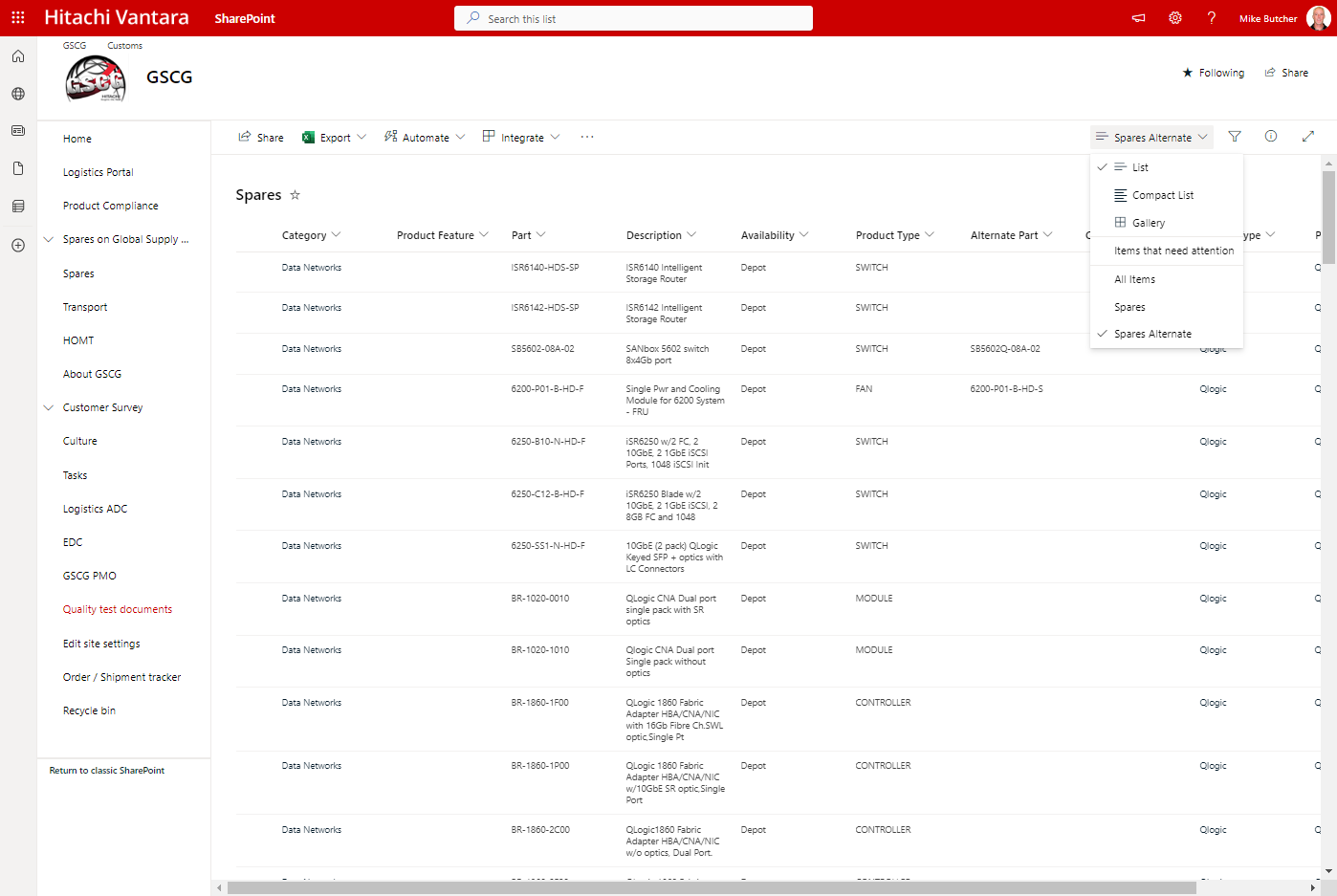
If you are having problems finding a spare part, do the following:
- Look in the maintenance manual
- Contact GSC for assistance
Hitachi Vantara Global Supply Chain Spares information is located on their GSCG SharePoint site.
Mechanical Replacement Procedures & Special Investigation
Procedures are defined at the following locations:
RMAs
Educational Plan
All Content Platform Knowledge Transfer and SRT content materials are published on this Microsoft Team.
Global Support Center Training
- Click here for information regarding Level 1 and 2 Global Support Center Training.
Knowledge Transfer (KT) and Support Readiness Training (SRT)
9.0 Training
- HCP 9.0 slide deck to be shared with GSC end of Feb/first week of March before HCP 9.0 RTM.
- Open channels for questions from GSC when slide deck is shared
- KT in mid-march or third week of march (whatever PM team prefers) – to be web recorded . Use dlist FileAndContentSRTDistribution FileAndContentSRTDistribution@hitachivantara.com
- Share web recording with GSC and field
Training archive on SharePoint
Field Engineer Training Requirements
Training objectives have been delivered to Global Learning to prepare training offerings for maintenance, install and configuration classes. These requirements were developed to ensure field engineers from Hitachi and Hitachi’ Qualified Partners are well prepared to support the product(s).
Training for Hitachi solutions that may include the product(s) may include solution specific references.
General Required Skill Sets
Product-Specific Skill Sets & Support Readiness Course Requirements
Global Learning and Its Course Offerings
- Learn more about Global Learning and its course offerings.
Channel Partner Service Programs
- For links and information related to Channel Partner Service Programs click here.
-
**This article is only visible to Employees**
Channel Partner Program
Please refer to these links for further information.
- Channel Partner Program
- Partner Program Overview
- Find out more about our award winning partner program
- Presentations
- Program Guides
- Program Recruitment Kit
- Partner Resources

Channel Partner Service Programs
Please refer to these links that contain helpful information.
- Channel Partner Service Programs Documentation
- Support Resources

ASP
ASPs should have the same capability to service products as Hitachi does direct. ASPs are required to train to the same standards as Hitachi’ own engineers and Hitachi provides maintenance documentation, spares and 2nd/3rd level support as part of Hitachi backline fees.
If the products are provided to customers as part of a solution, refer to the ASP section of the applicable Solution Product Support Plan.
ISP
Independent Service Provider
N/A
- Channel Partner Program
Appendices
Customer Replaceable Units (CRUs)
Estimated Maintenance Times
Anticipated Case Volume
Statement of Support
Third Party Products
Operating Systems
Feedback Form
- To access the feedback form, click here.