How to Update Email Address from Personal Domain to Business Domain on Support
Content
Objective
Update email address from a public domain (@gmail, @yahoo, @live...) to a business domain. The use of business domain is required for customer accounts, in order to gain more access to additional features on Support Connect such as: My Products, My Sites, Technical Bulletins, Knowledge and Cases.
Please note if you have already registered with a business domain, you cannot change it on Support Connect. Please contact us for further assistance.
Environment
Procedure
- Log in to Support
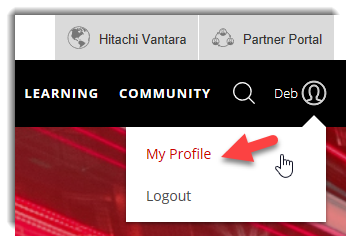
- Hover over Welcome (your name)! and click My Profile
- Click Edit.
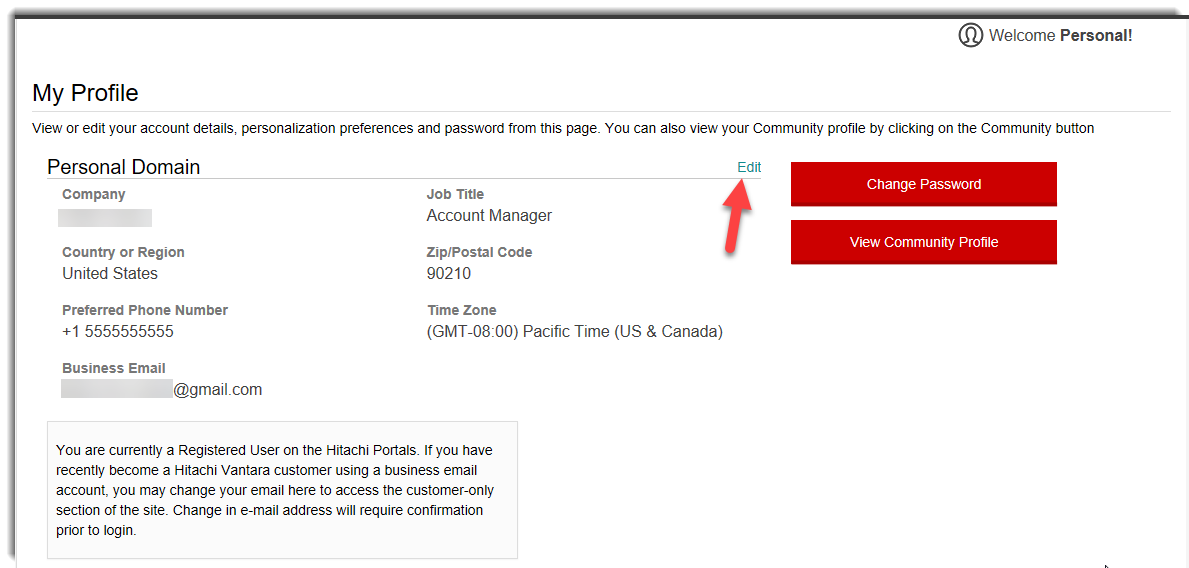
- Populate the Business Email field with your business email address and click save.

- A banner will appear toward the top of the page notifying you a validation email was sent. Be sure to click the validation link within 24 hours in order to access Support Connect using your updated email address.

- Navigate to email from Hitachi Vantara and click Activate Now
- You will be prompted to login
- After logging in, you may be prompted to select your company organization. Select the appropriate one and click continue.

- Confirm your selection by clicking yes

Additional Notes
Once registered using a personal email domain you will receive an email from Hitachi Vantara stating you are a guest user and in order to gain full access to Hitachi sites you can register with a business email address.
CXOne Metadata
Support Connect, Email,customer, Personal Domain, Business Domain, Registered User
Solution Properties
- Keywords
- https://knowledge.hitachivantara.com/Support_Information/Support_Website/How_to_Update_Email_Address_from_Personal_Domain_to_Business_Domain_on_Support
- Solution ID
- 242403050014624
- Last Modified Date
- 10/30/2024 01:54:53 PM
- Attributes
-
Page Privacy and Permission Assignment
- Page Privacy: Private
- Page Level Permissions: Anonymous; Employee; Service Partner; Customer; IT; eServices
- Article: howto
- Pagetype: knowledgearticle
- Taxonomy
- Collections
-
- Guest (Public)
- Views
- 0