

Summary
This article provides detailed instructions on how to collect logs from the Hitachi Content Platform (HCP) S Series. It covers two main procedures: collecting logs from both HCP and HCP S Series together, and collecting logs from HCP S Series only.
Objective
Collect logs from HCP S Series.
Environment
- Hitachi Content Platform (HCP) S Series
Procedure
Collect HCP S Series Logs and HCP Logs Together
- Log into the HCP System Management Console.
- Navigate to Monitoring tab → Internal Logs.
 NOTE: For the more information on how to collect the HCP logs, refer to the article Hitachi Content Platform (HCP) Data Collection.
 - Under S Series Node Preparation, select the checkbox next to the desired HCP S Series device before beginning the log collection:
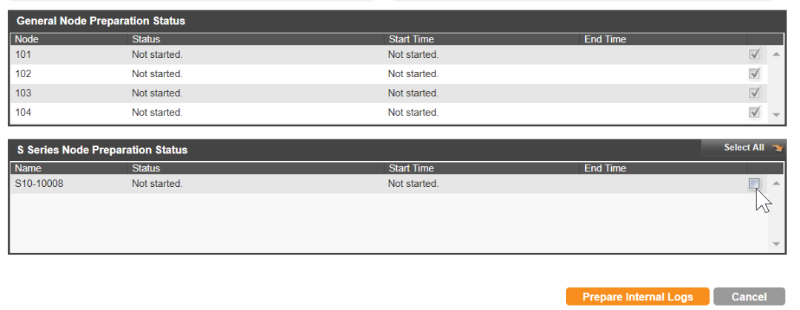
- Click Prepare Internal Logs
- Wait for the HCP to finish collecting the logs, when HCP finishes preparing the logs, the Prepare Internal Logs button changes to Download Internal Logs.
- Click on the Download Internal Logs button.
- When prompted, choose a location to save the log file download on your local system drive.
