How to Download License Keys from the Support Website
Content
Objective
How to download or email license keys from Support Connect.
Environment
Procedure
License Key Download Steps
Customers and Partners can access License Keys on the Support Website using the following instructions:
- Go to http://support.hitachivantara.com and login (requires registration).
- Hover over My Account in the drop down and click My Products
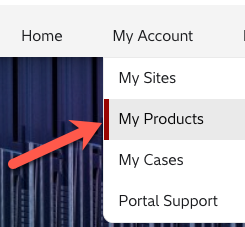
- Search and find the product by serial number.
- Scroll down on to the bottom of the page and find Licenses link

- Click Download License Key or Email License Key.
Additional Notes
- Only available for Hitachi storage products.
- If your Hitachi storage arrays are not listed, please contact your local Hitachi sales representative.
For more information about Support, please see the following articles:
Solution Properties
- Keywords
- https://knowledge.hitachivantara.com/Support_Information/Support_Website/How_to_Download_License_Keys_from_the_Support_Website raexternalrequest
- Solution ID
- 242403040001838
- Last Modified Date
- 09/01/2024 02:33:37 PM
- Attributes
-
Page Privacy and Permission Assignment
- Page Privacy: Private
- Page Level Permissions: Employee; Service Partner; Customer; IT; eServices
- Pagetype: knowledgearticle
- Article: howto
- Taxonomy
- Collections
-
- Guest (Public)
- Views
- 0