SVP Unresponsive After SIM 73FF00 For VSP F/G 1x00 and VSP 5000 Series
Content
Symptom
- SIM REF Code is 73FF00
- SVP is not responding
- SVP needs to be power cycled
Environment
- Service Processor (SVP)
- SIM REF Code 73FF00
- VSP G1X00 and VSP F1500 (DKC810I, R800)
- Virtual Storage Platform G1000 (VSP G1000)
- Virtual Storage Platform G1500 (VSP G1500)
- Virtual Storage Platform F1500 (VSP F1500)
- VSP 5000 Series (DKC910I, R900)
- Virtual Storage Platform 5100 (VSP 5100)
- Virtual Storage Platform 5100H (VSP 5100H)
- Virtual Storage Platform 5200 (VSP 5200)
- Virtual Storage Platform 5500 (VSP 5500)
- Virtual Storage Platform 5500H (VSP 5500H)
- Virtual Storage Platform 5600 (VSP 5600)
Resolution
Note: Do Not replace the SVP with a new part unless the procedure below dictates such.
- Perform forcible power off of SVP by holding the SVP PS OFF Switch for more than 5 seconds

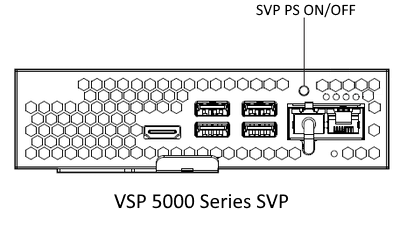
- If the SVP does not automatically power on after the power cycle, then use the PS ON button.
- If the SVP is not rebooting or is still non-responsive after holding PS OFF for more than 5 seconds, then self-replace the SVP (use the same part).
- If SVP is still non-responsive, replace it with a new part.
- VSP G1x00 and VSP F1500
- 5552759-A | SVP (WIN7)(Contains BNST)(CBXA)
- 5552759-P | SVP (WIN7)(Contains BNST)(CBXAC)(CBXE)
- 5552759-T | SVP (WIN10)(Contains BNST)
- 5552759-U | SVP (WIN10)(RoHS2 Compliant)
- VSP 5000 Series
- 3292715-A | SVP
- VSP G1x00 and VSP F1500
- If the SVP powers on, follow the procedure
- VSP G1x00 and VSP F1500
- DKC810I Maintenance Manual -> 14trbl.pdf -> section "3.15 Recovery Procedure for LAN Error/DKC Processor Failure/SVP Failure (SIM = 1400x0, 1500x0, 73xx00)" (TRBL03-15-10)
- VSP 5000 Series
- DKC910I Maintenance Manual -> e16TRBL0.pdf -> section "3.64 Recovery Procedure for LAN Error/SVP Failure (SIM = 73xxyy, 1400x0, 140200)" (TRBL03-64-10)
- VSP G1x00 and VSP F1500
Cause
73FF00 -> SVP Failure -> LAN Error -> Other AP


Additional Notes
- Do not replace SVPs without first following this article.
- If the problem reoccurs before six months have passed, replace the SVP.
- Cross-reference the appropriate maintenance manual sections
- VSP G1x00 and VSP F1500
- DKC810I Maintenance Manual ->
- 05loc.pdf -> Section "3.2 Other Switches and LEDs" -> [8] SVP (LOC03-120) and (LOC03-130) -> No. 8-2 SVP PS OFF -> Follow instructions for "Forcibly"
- 14trbl.pdf -> Section "3.15 Recovery Procedure for LAN Error/DKC Processor Failure/SVP Failure (SIM = 1400x0, 1500x0, 73xx00)" (TRBL03-15-10)
- 19parts.pdf -> Section "Table 4-1 Spare Parts List" (PARTS04-20) -> SVP Unit
- DKC810I Maintenance Manual ->
- VSP 5000 Series
- DKC910I Maintenance Manual ->
- e06LOC0.pdf -> Section "3.2 Other Switches and LEDs" -> "1. SVP" (LOC03-30) -> No. 1-1 SVP PS ON/OFF -> Follow instructions for "Forcibly".
- e16TRBL0.pdf -> Section "3.64 Recovery Procedure for LAN Error/SVP Failure (SIM = 73xxyy, 1400x0, 140200)" (TRBL03-64-10)
- e20PARTS0.pdf -> Section "Table 3-1 Maintenance Parts List" (PARTS03-10) -> SVP
- DKC910I Maintenance Manual ->
- VSP G1x00 and VSP F1500
CXOne Metadata
PageID: 170426
,VSP G1x00 and VSP F1500,VSP 5000 Series,VSP 5x00,LAN error,VSP F/G 1500/1000,Remote Ops,73FF00,73xx,73xx00,SVP Failure
Solution Properties
- Keywords
- https://knowledge.hitachivantara.com/Knowledge/Storage/SVP_Unresponsive_After_SIM_73FF00_For_VSP_FG_1x00_and_VSP_5000_Series 73FF SVP unresponsive
- Solution ID
- 240403060170426
- Last Modified Date
- 09/16/2024 11:24:16 AM
- Attributes
-
Page Privacy and Permission Assignment
- Page Privacy: Private
- Page Level Permissions: Support Center; Employee; Service Partner; Knowledge Author; Knowledge Editor; IT; eServices; Knowledge Draft
- Article: solution
- Pagetype: knowledgearticle
- Taxonomy
- Collections
-
- Service Partner
- Views
- 0