How to Perform a LAN Reset for VSP Gxx0, VSP Fxx0, and VSP E Series
Content
**This article is only visible to Service Partners and Hitachi Employees
Objective
-
How to perform a LAN Reset for...
-
VSP G130 G/F350 G/F370 G/F700 G/F900
-
VSP E Series
-
-
How to Reset GUM
Environment
- VSP G130 G/F350 G/F370 G/F700 G/F900 (DW850, HM850)
- VSP G130, G350, G370, G700, G900
- VSP F350, F370, F700, F900
- VSP E Series
- Virtual Storage Platform E590 (VSP E590) (DW900, HM900)
- Virtual Storage Platform E790 (VSP E790) (DW900, HM900)
- Virtual Storage Platform E990 (VSP E990) (DW850, HM850)
- Virtual Storage Platform E1090 (VSP E1090) (DW1000, HM1000)
-
Gateway for Unified Management (GUM)
-
LAN Reset (LAN-RST)
Procedure
- Confirm the location of the LAN-RST switch below.
VSP G130 (CBXSS/CBXSL)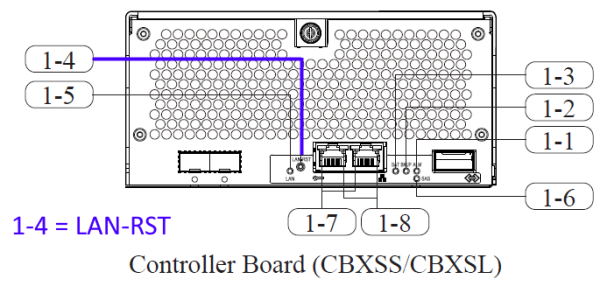
VSP F/G350 and VSP F/G370 (CBSS/CBSL)
VSP G/F700 (CBLH1), VSP G/F900 (CBLH2), VSP E990 (CBLHN), and VSP E1090(H) (CBLMH4)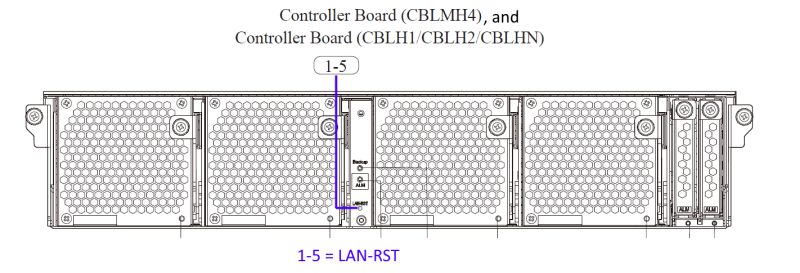
VSP E590(H) and VSP E790(H) (CBSN) (1-2)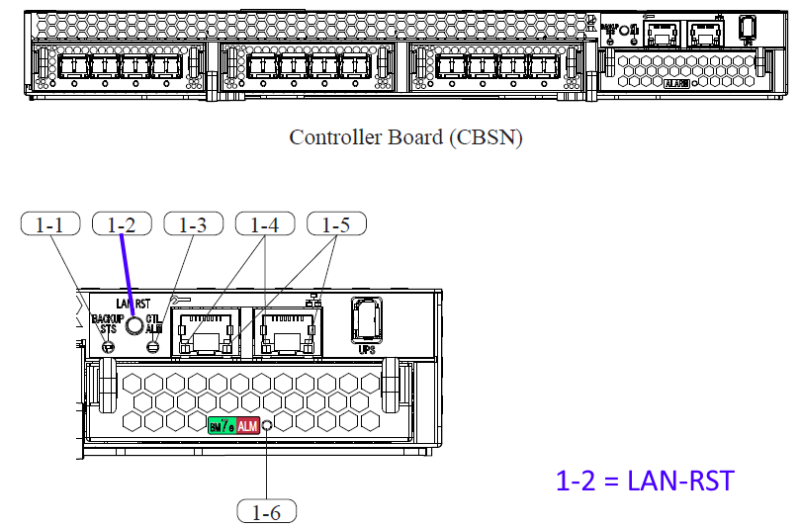
-
Press the controller LAN-RST switch that resets GUM for around one second (any sharp object such as a pen tip is necessary).
-
Wait for around five minutes.
-
Confirm that you can log into the Maintenance Utility of the reset controller (If you cannot log in, retry after waiting for one to two minutes. Note that it might take up to 20 minutes until you can log in.)
-
If you cannot log in even after waiting for 20 minutes, press the LAN-RST switch again for one second and perform the Step 2-4 again.
-
If the GUM of both controllers needs to reset, perform the above resetting GUM procedure from Step 1 to Step 5 for the other controller as well (Best Practice is to make sure the Maintenance Utility of at least one controller can allow logins before resetting the second controller).
Additional Notes
- For DW800 / HM800, see How to Perform a LAN Reset for VSP Gx00, Fx00, and Nx00 Series
- If you are rebooting the GUM for both controllers, perform the reboot only on one controller at a time and wait at least 20 minutes between each reboot (or until the Maintenance Utility for the reset controller allows a login)
Reference Material
- DW850/DW900/DW1000 Maintenance Manual -> e08MPC0.pdf -> Section "3.26 Resetting GUM" (MPC03-1250)
- DW850/DW900/DW1000 Maintenance Manual -> e06LOC0.pdf -> "3.2 Other Switches and LEDs" -> "1. Controller Board" ->
- CBXSS/CBXSL (LOC03-40) -> 1-4
- CBSS/CBSL (LOC03-50) -> 1-5
- CBLH1/CBLH2/CBLHN/CBLMH4 (LOC03-60) -> 1-5
- CBSN (LOC03-72) -> 1-2
CXOne Metadata
Tags: LAN Reset,LAN-RST,HM850,DW850,VSP G130 G/F350 G/F370 G/F700 G/F900,VSP E Series,HM900,DW900,Reset GUM,DW1000,HM1000
PageID: 166722
Solution Properties
- Keywords
- https://knowledge.hitachivantara.com/Knowledge/Storage/How_to_Perform_a_LAN-RST_for_HM850_HM900_HM1000
- Solution ID
- 240403060166722
- Last Modified Date
- 09/16/2024 11:09:58 AM
- Attributes
-
Page Privacy and Permission Assignment
- Page Privacy: Private
- Page Level Permissions: Support Center; Employee; Service Partner; Knowledge Author; Knowledge Editor; IT; eServices; Knowledge Draft
- Article: howto
- Pagetype: knowledgearticle
- Taxonomy
- Collections
-
- Service Partner
- Views
- 0