How to Reboot GUM for VSP (Gx00, Fx00, E Series, N Series) Models Through the Maintenance Utility
Content
Objective
- Reboot VSP G/Fx00, N Series, or E Series Gateway for Unified Managment (GUM) - maintenance utility.
- LAN reset for VSP G/Fx00, N Series, or E Series models.
Environment
- Hitachi Virtual Storage Platform G/Fx00 models (VSP G200, VSP G/F400, VSP G/F600, VSP G/F800)
- Hitachi Virtual Storage Platform G/Fx00 models (VSP G130, G/F350, G/F370, G/F700, G/F900)
- Hitachi Virtual Storage Platform N Series (VSP N400, VSP N600, VSP N800)
- Hitachi Virtual Storage Platform E Series (VSP E590, VSP E790, VSP E990, VSP E1090)
- Hitachi Device Manager (HDvM)
- Hitachi Storage Navigator (SN)
- Maintenance utility
Procedure
- Log in to the maintenance utility for the controller you want to reboot GUM.
- On the bottom left pane, underneath 'Menu,' click the down arrow to the right of 'System Management.'
- Select Reboot GUM.
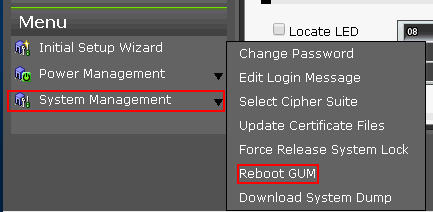
- Read and then confirm the warning message by clicking the Reboot button.
Note: When NAS Modules are installed in the Storage System and the NAS Unified Firmware status that can be viewed in the “Maintenance Utility” window is Active, if GUM is rebooted, the NAS Unified Firmware status is temporarily displayed as Active (Not Redundant). The status returns to Active before the login to the Maintenance Utility of the Controller in which GUM is rebooted is confirmed. - Log out of the maintenance utility while GUM reboots.
- GUM can take approximately 20 minutes to complete the reboot process.
- Confirm that you can log into the Maintenance Utility of the Controller.
(If you cannot login, wait for one to two minutes and attempt to login again.)
Additional Notes
- If you are rebooting GUM for both controllers, perform the reboot only on one controller at a time and wait at least 20 minutes between each reboot.
- If the software reboot does not work, you will need a field engineer to reboot GUM using the LAN reset switch.
CXOne Metadata
Tags: VSP G200 G400 G600 G800,VSP Gx00,VSP Fx00,GUM,reboot,VSP Gx00 and VSP Fx00,VSP G130 G/F350 G/F370 G/F700 G/F900,VSP N Series,VSP E Series
PageID: 3132
Solution Properties
- Keywords
- https://knowledge.hitachivantara.com/Knowledge/Storage/How_to_Reboot_GUM_for_VSP_Gx00_Fx00_E_Series_N_Series_Models_Through_the_Maintenance_Utility
- Solution ID
- 240403040003132
- Last Modified Date
- 09/05/2024 12:24:13 AM
- Attributes
-
Page Privacy and Permission Assignment
- Page Privacy: Private
- Page Level Permissions: Employee; Service Partner; Customer; Knowledge Author; Knowledge Editor; IT; eServices; Knowledge Draft
- Article: howto
- Pagetype: knowledgearticle
- Taxonomy
- Collections
-
- Customer
- Views
- 0